
DonutSMP Shard Displayer
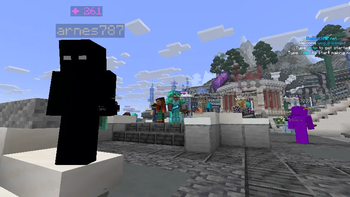
Displays DonutSMP player shard counts above their heads in real time. Fully client-side Fabric mod with customizable label appearance.
⬇ Download on Modrinth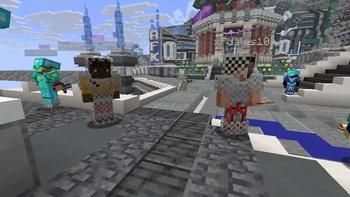
Shard Displayer
Displays DonutSMP player shard counts above their heads in real time, fetched from donutstats.net. Fully client-side Fabric mod with customizable label appearance.
🎯 Features
Automatic shard parsing from donutstats.net for all visible players
In-game label above players showing ✦ 12.5K (auto‑formatted with K, M, B, T suffixes)
Fully customizable display:
- Text color and scale
- Vertical offset above the player
- Background toggle
- Show/hide your own shards
- Debug mode – shows loading states (loading, err, waiting) to troubleshoot issues
- Smart caching: fast updates (every 15s) while active, relaxed (every 3min) in the background
- No API keys required – all data is taken from the public stats page
📋 Commands
All commands start with /shardslabel (tab completion works).
Command Description
/shardslabel on / off ==== Enable / disable shard labels
/shardslabel toggle ==== Toggle visibility
/shardslabel self on / off ==== Show / hide your own shard count
/shardslabel background on / off ==== Enable / disable background behind the label
/shardslabel scale <30..200> ==== Set text size in percent (default 70)
/shardslabel y ==== Vertical offset (range -100 to 100, default 25)
/shardslabel color <#RRGGBB> ==== Text color in HEX, e.g. #FFAA00
/shardslabel debug on / off ==== Enable debug mode
/shardslabel clearcache ==== Clear the stats cache
/shardslabel reload ==== Reload config from file
⚙️ Configuration
Settings are stored in config/shards.properties and created automatically on first launch.
📦 Installation
Install Fabric Loader for Minecraft 1.21.10 / 1.21.11
Download Fabric API and place it in your mods folder
Download the latest Shard Displayer jar and put it in mods as well
- Edition: Minecraft Java
- File type: .jar
- Minecraft versions listed: 1.21.10, 1.21.11
- How to install: Install the matching mod loader (Forge, Fabric or NeoForge) for your Minecraft version. → Download the .jar. → Put it in the .minecraft/mods folder and launch that loader profile.
- Where to get it: Opens on Modrinth — not every file is mirrored on our own servers.
Install steps are the general flow for this file type — How to install Minecraft Java mods & modpacks walks through it step by step.
- Ships as Donutsmp Shard Displayer 1.0.0.jar — drop this file into the mods folder
- Download size: 1.6 MB
- Download link checked 10 Sept 2026 — working
These come from our own check of the pack file, not from the source page.