
ModsJava
Speaking Device
This mod converts chat messages into speech in real-time using the ElevenLabs API. It features a voice selection menu to choose your preferred AI voice.
⬇ Download on Modrinth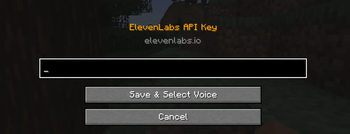
🎙️ Speaking Device
🔊 Vocal Synthesis Protocol
The system activates as soon as you equip the Speaking Device. Powered by the ElevenLabs API, every message you type in chat is instantly transformed into high-quality, natural speech.
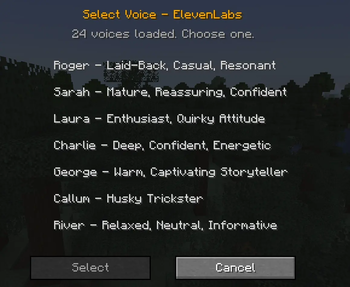
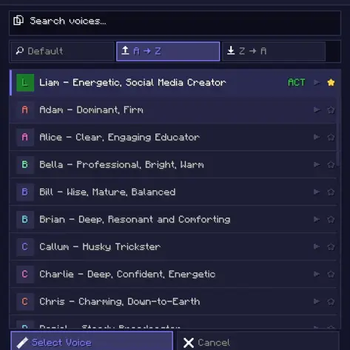
🎭 Voice Selection Interface
Find the perfect tone for your character. Choose from various AI voices within the mod to personalize your communication style.
🛠️ Controls
| Action | Description |
|---|---|
| Equip Item | Enables the system and starts the text-to-speech protocol. |
| V Key | Opens the voice selection menu to switch between different voices. |
Lead Developer: Shady1545
Helper: robotic1545
Quick facts
- Edition: Minecraft Java
- File type: .jar
- Minecraft versions listed: 1.20.1, 1.20.2, 1.20.3
- How to install: Install the matching mod loader (Forge, Fabric or NeoForge) for your Minecraft version. → Download the .jar. → Put it in the .minecraft/mods folder and launch that loader profile.
- Where to get it: Opens on Modrinth — not every file is mirrored on our own servers.
Install steps are the general flow for this file type — How to install Minecraft Java mods & modpacks walks through it step by step.
Verified by MCModsHub
- Ships as Speaking_Device - 2.0.0.jar — drop this file into the mods folder
- Download size: 792 KB
- Download link checked 9 Sept 2026 — working
These come from our own check of the pack file, not from the source page.