
Slot Jam
Java mod listed for Minecraft 1.21. Downloads from the MC Java Mods app on Android.
⬇ Download on Modrinth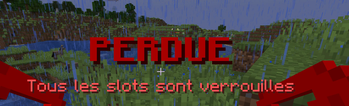
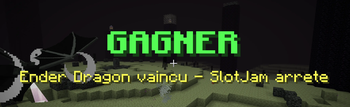
🛡️ SlotJam: The Ultimate Inventory Challenge Do you think Minecraft survival is getting too easy? SlotJam is here to disrupt your routine and put your organizational skills (and your nerves) to the test! The concept is simple yet ruthless: your inventory is closing in on you.
🕹️ How does it work? Every few seconds, a random slot in your inventory locks automatically. If you don’t stay on top of it, you’ll eventually find yourself unable to pick up even a single block of dirt. Resource management just became a high-stakes race against the clock!
💎 Reclaim Your Space Desperately need that specific slot for your Netherite sword? Don't panic. You can buy back your locked slots in exchange for diamonds. It’s time to make a choice: do you save your precious gems for your armor, or for the right to actually carry your loot?
⚙️ Fully Configurable The mod adapts to your specific playstyle. Through the configuration file, you can customize:
The Delay: The time interval between each slot lock.
The Cost: The amount of diamonds required to unlock a slot.
The Locking Mode: Choose between Random or Progressive locking.
🌐 Multiplayer Compatible Want to suffer together? The mod is 100% multiplayer compatible. Organize survival challenges with your friends or install it on your server to add a brand-new layer of difficulty. Who will be the richest (or the most organized) player to keep their inventory open?
Why install this mod? It’s the perfect addition for "Hardcore" modpacks or content creators looking for an original video concept. It’s simple, effective, and completely changes the game dynamic!
Ready to sacrifice your diamonds for a little elbow room? Download SlotJam now!
Commande
/slotjam show/slotjam menu/slotjam start/slotjam stop/slotjam reset- `/slotjam interval
/slotjam count <0..36>- `/slotjam armorCount <0..4>
/slotjam mainInventory <true|false>/slotjam armor <true|false>/slotjam offhand <true|false>
- Edition: Minecraft Java
- File type: .jar
- Minecraft version listed: 1.21.8
- How to install: Install the matching mod loader (Forge, Fabric or NeoForge) for your Minecraft version. → Download the .jar. → Put it in the .minecraft/mods folder and launch that loader profile.
- Where to get it: Opens on Modrinth — not every file is mirrored on our own servers.
Install steps are the general flow for this file type — How to install Minecraft Java mods & modpacks walks through it step by step.
- Ships as slotjam-mc1.21.8.jar — drop this file into the mods folder
- Download size: 28 KB
- Download link checked 3 Oct 2026 — working
These come from our own check of the pack file, not from the source page.