
Clean Hitbox
Java mod listed for Minecraft 1.21. File opened and checked on 12 Oct 2026; downloads from the MC Java Mods app on Android.
A lightweight Fabric client mod that enhances Minecraft’s F3+B hitboxes with clear visuals, customizable colors, and target highlighting for better combat…
⬇ Download on Modrinth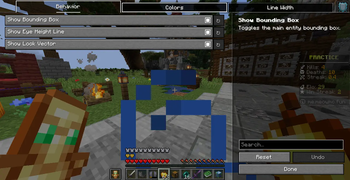
🧼 Clean Hitbox
Clean Hitbox is a lightweight Fabric client-side mod for Minecraft 1.21 that enhances the vanilla debug hitbox system (F3 + B) with improved visuals, better clarity, and combat friendly highlighting without changing any gameplay mechanics. Oe Just Use A "V" Keybind TO Open GuI
✨ Overview
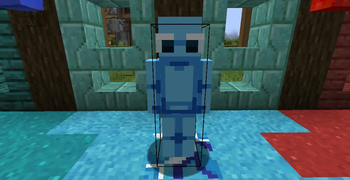
Minecraft’s default hitboxes are useful but very minimal and hard to read during fast-paced combat. Clean Hitbox improves this by making them clear, customizable, and visually optimized so you can better understand entity positioning, range, and targeting in real time.
This mod is strictly visual-only and does not modify hit detection, reach, or combat mechanics.
🔥 Features
🎯 Target-Based Highlighting
When you aim at an entity, its hitbox is automatically highlighted Makes it easy to instantly identify your current target in combat 🎨 Fully Customizable Colors Change colors for different hitbox elements: Entity bounding box Eye height line Look direction vector Default setup is optimized for visibility, but fully adjustable 📏 Adjustable Line Thickness Increase or decrease hitbox line width Helps visibility in PvP, PvE, and crowded environments 🔲 Toggleable Components Enable or disable individual parts of the hitbox: Bounding box Eye line Look direction vector
🧩 Vanilla Integration
Works directly with Minecraft’s F3 + B debug hitboxes No replacement system — only enhances existing rendering
⚙️ Technical Details
Built for Fabric 1.21 Client-side only (no server requirement) Uses Fabric API + Mixin Lightweight rendering optimized for performance No gameplay or combat modifications
🚫 What This Mod Does NOT Do
- ❌ No reach or hitbox manipulation
- ❌ No combat advantage mechanics
- ❌ No server-side changes
- ❌ No FPS-heavy rendering systems
🧠 Why Use Clean Hitbox?
Better visibility during PvP fights Easier tracking of entity positions Cleaner debugging experience Lightweight and performance-friendly
📦 Installation
Install Fabric Loader (1.21) Install Fabric API Drop Clean Hitbox into your /mods folder Launch the game and press F3 + B
📜 License
Free to use. No modifying, selling, or reuploading.
🌐 Socials
Modrinth: https://modrinth.com/user/MineBoost
GitHub: https://github.com/ShirjeelPlays
Discord: https://discord.gg/KbG9bs5pzQ
- Edition: Minecraft Java
- File type: .jar
- Minecraft versions listed: 1.21, 1.21.1, 1.21.2
- How to install: Install the matching mod loader (Forge, Fabric or NeoForge) for your Minecraft version. → Download the .jar. → Put it in the .minecraft/mods folder and launch that loader profile.
- Where to get it: Opens on Modrinth — not every file is mirrored on our own servers.
Install steps are the general flow for this file type — How to install Minecraft Java mods & modpacks walks through it step by step.
- Ships as clean-hitbox-1.0.1.jar — drop this file into the mods folder
- Download size: 1.8 MB
- Download link checked 9 Oct 2026 — working
These come from our own check of the pack file, not from the source page.