
TellusCN
Java mod listed for Minecraft 1.21. Downloads from the MC Java Mods app on Android.
⬇ Download on Modrinth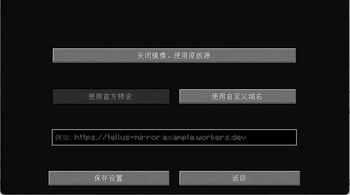
TellusCN
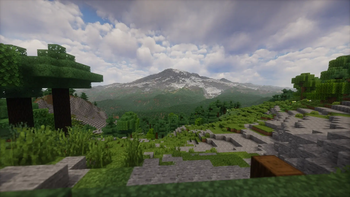
TellusCN is a community fork of the Fabric mod Tellus, optimized for Chinese players. that recreates real-world terrain in Minecraft by generating Earth-scale landscapes from geographic data. It focuses on realistic elevation, biome placement, and climate-driven time and weather, aiming to make the world feel like a playable map of our planet.
Copyright
- Original Author: Yucareux
- TellusCN (Chinese Mirror & CDN Support): BlackHoleEra-Team
- License: LGPL-3.0

Inspired by Gegy's Terrarium: https://modrinth.com/mod/terrarium
Survival note: Some survival features are still missing (including certain structures and biomes). While a survival world is possible, upcoming updates may break those worlds; for now Tellus is better suited for testing and exploration than long-term survival.
Internet & data note: Tellus requires an active internet connection and will not work offline. It downloads terrain, land cover, climate, and weather data on demand; expect ongoing data usage that varies with how much of the world you explore.
Server support note: Tellus must be installed on the server, but is not required on clients. Official server support is not available yet; for now you should create the world in singleplayer first, then move that world to the server (with Tellus installed) so new chunks generate with Tellus.
Note: generative AI was used during the creation of this mod.
Features
- Earth-scale terrain generated from geographic elevation data
- Highly customizable terrain generation (scale, height limits, and more)
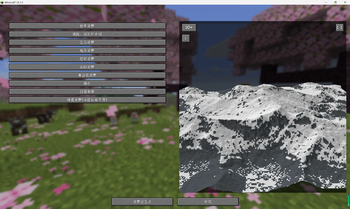
- Built-in terrain preview screen for visualizing settings before world creation
- Biomes placed to match real-world climate regions
- Real-time inspired weather and time systems (optional)
- Distant Horizons integration for long-distance terrain rendering
- In-game map teleport UI for choosing real-world locations
Distant Horizons Integration
Tellus integrates with the Distant Horizons (DH) mod to render planet-scale terrain far beyond vanilla view distance. When DH is installed, Tellus registers a DH world-generation override for Tellus worlds (DH API v4+), so distant terrain is built using Tellus data and settings instead of generic vanilla sampling.
- Fast mode: Tellus provides a custom LOD generator that samples its elevation, land-cover, climate, and water data directly to build distant terrain quickly and consistently with your world settings.
- Detailed mode: Tellus delegates to DH's chunk-based generator for far terrain, which is more accurate but significantly heavier on performance.
Because Tellus worlds are Earth-scale, DH is strongly recommended and is almost essential for comfortable exploration and long-distance views.
Commands
/tellus map: Opens the GeoTP map UI (requires gamemaster permissions)./tellus weather: Shows local Tellus weather and time information at your current position./tellus config weather enable_realtime_time <true|false>: Overrides the real-time time setting on the server (requires gamemaster permissions)./tellus config weather enable_realtime_weather <true|false>: Overrides the real-time weather setting on the server (requires gamemaster permissions).
More commands will be added over time.
SettingsThese options are available in the "Customize World Generation" screen when creating a Tellus world.

World Settings
- World Scale: Controls how many real-world meters are represented by one block. Lower values create more detailed, larger worlds; higher values compress distances and features. Current limits are 1:1m to 1:500m per block, with larger scales planned up to 1:40km.
- Terrestrial Height Scale: Multiplier that converts elevation above sea level from meters to blocks. Higher values produce taller mountains and landforms.
- Oceanic Height Scale: Multiplier that converts elevation below sea level from meters to blocks. Higher values deepen oceans and trenches.
- Height Offset: Shifts all terrain up or down by a fixed number of blocks. Use this to raise or lower the entire world.
- Sea Level: Sets the waterline in blocks without shifting the terrain. Set to Automatic to track the height offset.
- Max Altitude: Upper world limit in blocks. Set to Automatic to let Tellus compute a safe cap based on your scale settings.
- Min Altitude: Lower world limit in blocks. Set to Automatic to let Tellus compute a safe floor based on your scale settings.
- River/Lake Shoreline Blend: Distance in blocks used to smooth river and lake edges into nearby terrain.
- Ocean Shoreline Blend: Distance in blocks used to smooth ocean coastlines into land.
- Limit Shoreline Blend on Cliffs: Prevents shoreline smoothing on steep slopes to preserve sharp cliffs.
Ecological Settings (work in progress)
These options are currently locked and not adjustable yet. They describe what will be configurable in a future update.
- Land Vegetation: Will enable grasses, flowers, and small plants on land.
- Land Vegetation Density: Will control how dense land vegetation appears.
- Tree Density: Will control how many trees spawn in eligible biomes.
- Aquatic Vegetation: Will enable kelp and seagrass in water.
- Crops in Villages: Will add village farm plots during village generation.
Geological Settings
The cave and underground generation system is still work in progress, so expect changes here.
- Cave Generation: Toggles underground cave generation.
- Ore Distribution: Enables vanilla ore distribution in Tellus worlds.
- Lava Pools: Enables underground lava pools.
Structure Settings
This section lets you toggle vanilla structures and world features on or off, such as villages, temples, monuments, ruins, and underground features like Deep Dark and amethyst geodes. Some structures (notably Deep Dark and certain ocean structures) may not generate properly yet and are still work in progress.
Real-Time Settings
- Real-Time Time: Syncs the in-game day/night cycle to real-world time based on your in-game location, so sunrise and sunset match that location's local clock.
- Real-Time Weather: Pulls live weather conditions for your location and mirrors them in-game (rain, thunder, or snow) instead of Minecraft's default weather rolls.
- Historical Snow Coverage (work in progress): Tracks recent temperature and snowfall data to decide if snow should appear and persist on the ground, creating more realistic seasonal snow coverage.
Compatibility Settings
- Distant Horizons Render Mode: Fast uses Tellus's LOD generator to build simplified distant terrain quickly with lower cost. Detailed asks Distant Horizons to use full chunk generation for far terrain, which is more accurate but significantly slower and heavier. For most setups, keeping Fast LOD generation is recommended.
- LOD Water Resolver: Adds detailed water depth sampling to Distant Horizons fast LODs, improving coastlines, lakes, and ocean floors at distance but with extra cost. If you plan to play around water-heavy regions, it is suggested to keep this enabled; otherwise you can disable it for better performance.
- Coming Soon: Additional compatibility options are work in progress and currently unavailable.
Cache
- OSM data: Cached map, road, and water tiles used by Tellus map and OSM features. Deleting will force re-downloads as needed.
- ESA WorldCover: Cached land cover tiles used for biome and vegetation lookups.
- Koppen climate: Cached climate raster used for biome climate classification.
- Terrain tiles: Cached elevation tiles used for terrain height sampling.
- ArcticDEM: Cached ArcticDEM index files used when the ArcticDEM DEM provider is selected.
- Total: Combined size of all Tellus caches (read-only).
- Delete cache / Delete all cache: Removes cached data to free disk space; data will be re-downloaded or rebuilt as needed.
ESA WorldCover 2021 (land cover)
- ESA WorldCover 2021 (10 m land cover, v200)
- (c) ESA WorldCover project / Contains modified Copernicus Sentinel data (2021)
- processed by ESA WorldCover consortium.
- License: CC BY 4.0
- https://creativecommons.org/licenses/by/4.0/
- https://doi.org/10.5281/zenodo.7254221
- In-game processing: reprojected to the world grid, resampled to blocks, and cached as tiles for fast lookup.
Koppen-Geiger climate classification
- Source: Beck, H.E., Zimmermann, N.E., McVicar, T.R., et al. (2018).
- Present and future Koppen-Geiger climate classification maps at 1-km resolution (Scientific Data).
- License: CC BY 4.0
- https://creativecommons.org/licenses/by/4.0/
- Publication DOI:
- https://doi.org/10.1038/sdata.2018.214
- In-game processing: reprojected and resampled to match the world grid, cached for fast lookup.
Terrain Tiles (global DEM tiles)
- Terrain Tiles (AWS Open Data Registry / Mapzen Jord)
- https://registry.opendata.aws/terrain-tiles
- Source attributions for Terrain Tiles:
- ArcticDEM terrain data: DEM(s) were created from DigitalGlobe, Inc. imagery and funded under National Science Foundation awards 1043681, 1559691, and 1542736.
- Australia terrain data (c) Commonwealth of Australia (Geoscience Australia) 2017.
- Austria terrain data (c) offene Daten Osterreichs - Digitales Gelandemodell (DGM) Osterreich.
- Canada terrain data contains information licensed under the Open Government Licence - Canada.
- Europe terrain data produced using Copernicus data and information funded by the European Union - EU-DEM layers.
- Global ETOPO1 terrain data U.S. National Oceanic and Atmospheric Administration.
- New Zealand terrain data Copyright 2011 Crown copyright (c) Land Information New Zealand and the New Zealand Government (All rights reserved).
- Norway terrain data (c) Kartverket.
- United Kingdom terrain data (c) Environment Agency copyright and/or database right 2015. All rights reserved.
- United States 3DEP (formerly NED) and global GMTED2010 and SRTM terrain data courtesy of the U.S. Geological Survey.
Open-Meteo (weather)
- Weather data provided by Open-Meteo.com.
- https://open-meteo.com/
- License: CC BY 4.0
- https://creativecommons.org/licenses/by/4.0/
- Credit: "Weather data by Open-Meteo.com".
- https://doi.org/10.5281/ZENODO.7970649
- Edition: Minecraft Java
- File type: .jar
- Minecraft version listed: 1.21.1
- How to install: Install the matching mod loader (Forge, Fabric or NeoForge) for your Minecraft version. → Download the .jar. → Put it in the .minecraft/mods folder and launch that loader profile.
- Where to get it: Opens on Modrinth — not every file is mirrored on our own servers.
Install steps are the general flow for this file type — How to install Minecraft Java mods & modpacks walks through it step by step.
- Ships as TellusCN-1.21.1-1.0.0.jar — drop this file into the mods folder
- Download size: 21.7 MB
- Download link checked 9 Oct 2026 — working
These come from our own check of the pack file, not from the source page.