
HerobrineHUD
HerobrineHUD - Minecraft E-sports Broadcasting & Spectator System HerobrineHUD is a mod tailor-made for Minecraft E-sports , live streaming, and…
I don't know my version or loader
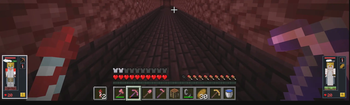
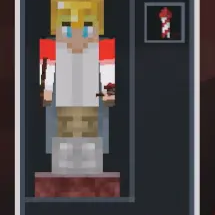
HerobrineHUD - Minecraft E-sports Broadcasting & Spectator System
HerobrineHUD is a mod tailor-made for Minecraft E-sports, live streaming, and professional broadcasting environments. Whether you are hosting a massive official tournament or casual multiplayer minigames, this mod is designed to deliver a top-tier, system-level spectator interface.
Our philosophy: Minecraft has never been short on incredibly fun games, but it has always lacked a system-level UI tool to make those games visually captivating for the audience.
✨ Core Features
Currently, HerobrineHUD provides a truly out-of-the-box experience (zero config required). Simply install the mod on both the server and the broadcaster's client, and the client will seamlessly display real-time team information and player statuses. Vanilla /team groupings automatically sync directly to the broadcaster's HUD panel!
Broadcaster / Operator Hotkeys:
HKey: Quickly toggle the HUD visibility.KKey: Open the HUD Management & Settings GUI. Here, you can toggle specific UI elements (such as armor slots, potion effects, etc.) and easily manage which players are displayed on the left and right sides of your screen.- Numpad Keys (1~9, 0): Quick Camera Switching. While in Spectator mode, simply press the numpad key corresponding to a player's slot number on your screen, and your camera will instantly and smoothly lock onto that player's POV!
What HerobrineHUD aims to clearly present for broadcasters:
- Team-based player card layouts
- Real-time player health and status changes
- Equipment, potion effects, and in-game information displays
- A high-efficiency control experience tailored for spectating and camera switching
📌 Current Status
The multi-version migration and version-specific architecture for the Fabric side have been completed.
Currently supported Minecraft versions:
26.11.21.11
🚀 Future Plans
This mod is built upon the concept of standard GSI (Game State Integration). Its goal is not just to "display in-game information", but to gradually build a more complete presentation ecosystem for Minecraft E-sports and live broadcasting.
Long-term plans include:
- Extensive GSI State Fields (Future Open API): We will gradually expose more game state data, allowing third-party mods to seamlessly inject their custom gamemode rules or specific extension data directly into the HUD rendering pipeline, eventually evolving into an open API ecosystem.
- Real-time HTTP Broadcasting: The server side will feature an interface to broadcast game data as a real-time HTTP service. This will allow purely external applications to consume live data and utilize Web technologies to build dedicated, third-party overlay interfaces (e.g., directly usable as an OBS Browser Source, eliminating the need for traditional game window capture).
🗺️ Roadmap
- Integrate the AUI framework, bringing native Web technology into the game to flexibly render stunning, highly customizable Web-style UIs.
- Provide a rich UI theme framework alongside full Theme Manager support.
- Support for additional mod loaders, such as NeoForge.
🛠️ Development & Debugging
Windows PowerShell:
.\gradlew.bat build
Run Client:
.\gradlew.bat runDebugClient
.\gradlew.bat runDebugClient "-PdebugVersion=26.1"
.\gradlew.bat runDebugClient "-PdebugVersion=1.21.11"
Run Server:
.\gradlew.bat runDebugServer
.\gradlew.bat runDebugServer "-PdebugVersion=26.1"
.\gradlew.bat runDebugServer "-PdebugVersion=1.21.11"
🧱 Project Structure
common/: Shared data models and common logicfabric/: Shared Fabric implementation and version-specific override codefabric-remap/: Remap build path for1.21.x
Under fabric/src/:
- Shared server / platform logic:
fabric/src/main/ - Shared client logic:
fabric/src/client/ - Version-specific main overrides:
fabric/src/mc<version>/main/ - Version-specific client overrides:
fabric/src/mc<version>/client/
- Edition: Minecraft Java
- File type: .jar
- Minecraft versions listed: 26.1, 26.1.1, 26.1.2
- How to install: Install the matching mod loader (Forge, Fabric or NeoForge) for your Minecraft version. → Download the .jar. → Put it in the .minecraft/mods folder and launch that loader profile.
- Where to get it: Opens on Modrinth — not every file is mirrored on our own servers.
Install steps are the general flow for this file type — How to install Minecraft Java mods & modpacks walks through it step by step.
- Ships as herobrinehud-26.1-0.1.2.jar — drop this file into the mods folder
- Download size: 482 KB
- Download link checked 8 Sept 2026 — working
These come from our own check of the pack file, not from the source page.