
Serenity Co-ordinates
Java mod listed for Minecraft 26.x. Downloads from the MC Java Mods app on Android.
A lightweight coordinate HUD that displays your position, facing direction, and in-game time above the hotbar.
⬇ Download on Modrinth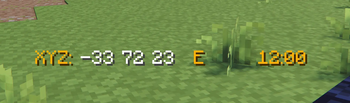
A lightweight, clean coordinate HUD for NeoForge that stays out of your way while giving you exactly what you need.
Serenity Coords displays your XYZ position, facing direction, and in-game time in a compact, stylized overlay above the hotbar — designed to feel like it belongs in vanilla.
✨ Features
•	📍 Real-time coordinates (block-accurate XYZ)
•	🧭 Cardinal direction (N / S / E / W)
•	⏰ In-game clock (24-hour format)
•	🎯 Centered above hotbar — no clutter, no overlap
•	🎨 Clean color styling for quick readability
•	⌨️ Toggle with a keybind (default: C)
•	⚡ Lightweight & client-side only
🎮 Designed for gameplay
No debug screen. No oversized UI. No data functions. Just the information you actually use — always visible, never distracting.
⚙️ Compatibility • NeoForge 26.1+ • Client-side only (safe for servers)
- Edition: Minecraft Java
- File type: .jar
- Minecraft versions listed: 26.1, 26.1.1, 26.1.2
- How to install: Install the matching mod loader (Forge, Fabric or NeoForge) for your Minecraft version. → Download the .jar. → Put it in the .minecraft/mods folder and launch that loader profile.
- Where to get it: Opens on Modrinth — not every file is mirrored on our own servers.
Install steps are the general flow for this file type — How to install Minecraft Java mods & modpacks walks through it step by step.
- Ships as serenitycoords-1.0.0.jar — drop this file into the mods folder
- Download size: 10 KB
- Download link checked 13 Nov 2026 — working
These come from our own check of the pack file, not from the source page.