
ModsJava
ArmorHudOverlay
A simple and highly customizable HUD overlay that displays your current armor and its durability directly on the screen.
⬇ Download on Modrinth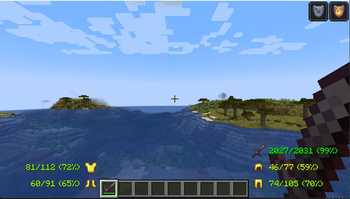
ArmorHudOverlay
ArmorHudOverlay is a lightweight and efficient client-side mod designed to enhance your survival experience by providing real-time information about your equipped gear.
🛡️ Features:
- Live HUD: View your current armor pieces (helmet, chestplate, leggings, and boots) directly on your main screen.
- Durability Tracking: Clearly see the remaining durability of each item so you never break your gear unexpectedly.
- Minimalist Design: The overlay is designed to be non-intrusive and fits perfectly with the vanilla Minecraft aesthetic.
- Optimized Performance: Built for Fabric, ensuring zero impact on your FPS.
⚙️ Compatibility:
- Loader: Fabric & Quilt.
- Version: Compatible with the latest Minecraft versions.
- Client-side only: This mod does not need to be installed on the server.
🛠️ Installation:
- Make sure you have the Fabric Loader installed.
- Drop the
ArmorHudOverlay.jarfile into yourmodsfolder. - Launch the game and enjoy!
Developed by andriyt2233
Quick facts
- Edition: Minecraft Java
- File type: .jar
- Minecraft version listed: 1.21.4
- How to install: Install the matching mod loader (Forge, Fabric or NeoForge) for your Minecraft version. → Download the .jar. → Put it in the .minecraft/mods folder and launch that loader profile.
- Where to get it: Opens on Modrinth — not every file is mirrored on our own servers.
Install steps are the general flow for this file type — How to install Minecraft Java mods & modpacks walks through it step by step.
Verified by MCModsHub
- Ships as ArmorHud-1.21.4.jar — drop this file into the mods folder
- Download size: 11 KB
- Download link checked 11 Sept 2026 — working
These come from our own check of the pack file, not from the source page.