




 О моде / About the Mod
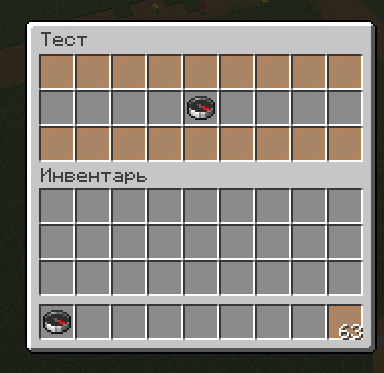
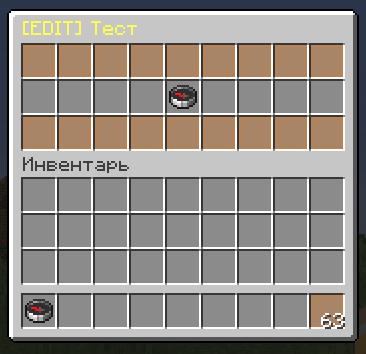
GuiMod — локальный мод для Fabric, добавляющий систему виртуальных меню-сундуков без единого реального блока в мире. Администраторы создают интерактивные GUI прямо через команды: расставляют предметы, назначают команды на слоты и открывают меню игрокам по правому клику на предмет с NBT-тегом GUI.
Подходит для: хабов, варпов, выдачи китов, магазинов, диалогов с NPC, админ-панелей и любых других интерактивных меню.
GuiMod is a local-side Fabric mod that adds a virtual chest GUI system — no real blocks required. Admins build interactive menus via commands: place items into slots, assign commands, and trigger menus by right-clicking any item with a GUI NBT tag.
Use cases: server hubs, warps, kit dispensers, shops, NPC dialogues, admin panels, and any other interactive menu you can imagine.
Ключевые возможности / Key Features
[ RU ]
- Создавай меню прямо в игре — открывается реальный сундук, расставляй предметы по слотам
- Правый клик по предмету в редакторе — чат предложит ввести команду для этого слота
- Команды выполняются от лица игрока, который кликнул
- Три типа сундуков: стандартный (27 слотов), двойной (54 слота), эндер-сундук
- Кастомные заголовки с поддержкой цветовых кодов (
§a,§6и т.д.) - Слоты «взятия» — игрок забирает предмет в инвентарь вместо запуска команды
- Меню сохраняются как JSON-файлы — можно редактировать вручную без перезагрузки
- Открытие меню правым кликом по любому предмету с тегом
GUIв NBT
[ EN ]
- Build menus in-game — a real chest opens, place items into any slots
- Right-click an item in the editor — chat prompts you to type a command for that slot
- Commands run as the player who clicks
- Three chest types: standard (27 slots), double (54 slots), ender chest appearance
- Custom titles with full color code support (
§a,§6, etc.) - Take-item slots — the player receives the item into their inventory instead of triggering a command
- Menus saved as JSON files — edit manually without reloading
- Trigger menus by right-clicking any item with a
GUINBT tag
Команды / Commands
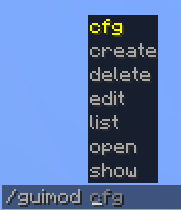
Все команды требуют права оператора (уровень 2). / All commands require operator permission (level 2).
| Команда / Command | Описание / Description |
|---|---|
/guimod create <id> |
Создать новое меню / Create a new menu |
/guimod edit <id> |
Редактировать существующее меню / Edit an existing menu |
/guimod delete <id> |
Удалить меню / Delete a menu |
/guimod show <id> |
Открыть меню в режиме просмотра / Open menu as preview |
/guimod open <id> |
Открыть меню как игрок / Open menu as a player |
/guimod list |
Список всех меню / List all menus |
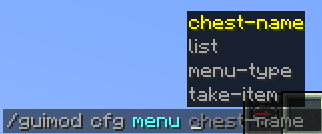
/guimod cfg <id> menu-type <type> |
Тип сундука: chest, double, enderchest / Set chest type |
/guimod cfg <id> chest-name <name> |
Заголовок меню / Set menu title |
/guimod cfg <id> take-item <from> <to> |
Диапазон слотов взятия / Set take-item slot range |
/guimod cfg <id> list |
Текущий конфиг меню / Show current menu config |
Пример использования / Example Workflow
[ RU ]
- Создай меню:
/guimod create kits_menu - Расставь предметы по слотам, закрой сундук
- Правый клик по предмету → введи команду, например
function pvpmap:give_kit_sword - Задай заголовок:
/guimod cfg kits_menu chest-name §6Choose a Kit - Выдай себе триггер-предмет:
/give @s minecraft:compass[custom_data={GUI:"kits_menu"}] - Правый клик компасом → меню открывается, клик по предмету → кит выдан
[ EN ]
- Create a menu:
/guimod create kits_menu - Place items into slots, close the chest
- Right-click an item → type a command, e.g.
function pvpmap:give_kit_sword - Set a title:
/guimod cfg kits_menu chest-name §6Choose a Kit - Give yourself a trigger item:
/give @s minecraft:compass[custom_data={GUI:"kits_menu"}] - Right-click the compass → menu opens, click the item → kit given
Поддерживаемые версии / Supported Versions
| Версия / Version | Поддержка / Support |
|---|---|
| 1.21 — 1.21.8 | Supported |
Fabric only — Requires Fabric API
Язык / Language
Русский • English
- Edition: Minecraft Java
- File type: .jar
- Minecraft version listed: 1.21.8
- How to install: Install the matching mod loader (Forge, Fabric or NeoForge) for your Minecraft version. → Download the .jar. → Put it in the .minecraft/mods folder and launch that loader profile.
- Where to get it: Opens on Modrinth — not every file is mirrored on our own servers.
Install steps are the general flow for this file type — How to install Minecraft Java mods & modpacks walks through it step by step.
- Ships as guimod-1.21.8-v1.0.0.jar — drop this file into the mods folder
- Download size: 87 KB
- Download link checked 21 Aug 2026 — working
These come from our own check of the pack file, not from the source page.