HomeJavaDatapacksMinecraft But Backwards
Minecraft But Backwards
DatapacksJava

Minecraft But Backwards

by Bebu · on Modrinth

Minecraft But Backwards completely reverses progression; you begin in the End and slowly work your way back to the Overworld.

Which build do you need?

This mod ships a separate file for every mod loader and every version of the game. Pick both, then download — the wrong build installs fine and then does nothing in the game.

Mod loader

Minecraft version

⬇ Download for 26.1–26.2 · Data pack⬇ Download for 26.1–26.2 · Fabric⬇ Download for 26.1–26.2 · Forge⬇ Download for 26.1–26.2 · NeoForge
I don't know my version or loader
Open the Minecraft launcher and look at the profile you play on — it names both, like fabric-loader-1.21.4. The version also shows in the bottom-right corner of the game's main menu.
No loader in the profile name? Then it's plain Minecraft, and these mods won't run — you need Fabric or NeoForge installed first.
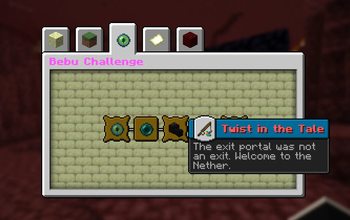
Minecraft But Backwards — screenshot 1

Minecraft But Backwards

Minecraft But Backwards completely reverses Minecraft’s normal progression; you begin stranded in the End, defeat the Ender Dragon to escape, survive through the Nether, and finally reach the Overworld. Every step of the journey is flipped upside down, turning simple milestones into major achievements, where even getting your first wood block becomes the true end goal.

Features

📦 Installation

This is a Datapack - no mods required.

  1. Download the .zip file
  2. Open Minecraft and navigate to your world's folder
    • %appdata%.minecraft\saves<YourWorldName>\ on Windows
    • ~/Library/Application Support/minecraft/saves// on macOS
  3. Drop the .zip directly into the datapacks folder (do not unzip it)
  4. Launch your world and run /reload if the world is already open
  5. Watch for the Bebu load message in chat, you're live!

❓ FAQ

Q: Does this work with Fabric or Forge mods?

A: Yes. It's a vanilla datapack and runs alongside any mods without conflict.

Q: Can I use this on a server?

A: Absolutely. It's designed with multiplayer in mind.

Q: Does it work on existing worlds?

A: Not tested. Recommended on a Fresh World

Quick facts

Install steps are the general flow for this file type — see the MC Java Mods guides for the full walkthrough.

Verified by MCModsHub

These come from our own check of the pack file, not from the source page.

Explore more