Wrapped
Java mod listed for Minecraft 26.x. Downloads from the MC Java Mods app on Android.
The cross-server playtime tracker Mojang never built. Plus blocks, deaths, biomes — and a shareable Wrapped card every Sunday.
I don't know my version or loader
Minecraft Wrapped — Play Time Tracker
A Fabric mod that tracks your total playtime across every Minecraft world and server you've ever played, plus the detail behind it: blocks, deaths, biomes, mob kills, distance, XP, advancements.
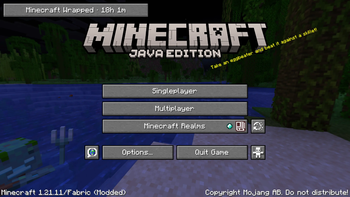
Your lifetime hours show on the title screen as a small HUD. Stats sync to minecraftwrapped.com, where you get a personal dashboard and a shareable Wrapped card every Sunday.
Features
- Lifetime playtime aggregated across every world and server you join — vanilla tracks per-world, this gives you the total.
- Active vs AFK split, with a configurable idle threshold.
- Title-screen HUD that ticks up in real time as you play.
- Retroactive import of your pre-mod single-player history from
saves/*/stats/<uuid>.jsonon first launch. - Per-event detail: block break/place include block type, tool, biome, coordinates; deaths include cause and dimension; mob kills include mob type.
- Session boundaries with server attribution for multiplayer sessions.
- Offline-resilient — events queue to a local file and sync when you reconnect.
- Web dashboard: 24h × 7-day activity heatmap, top blocks, top servers, biome wheel, playstyle radar, top death causes.
- Weekly Wrapped card auto-generated every Sunday at 00:00 UTC.
Title-screen idle time does not count toward your hours. Only time spent in a world is recorded.
How it works
The mod reads Minecraft's own ServerStatHandler and stats/*.json files on a poll — vanilla already tracks blocks mined, mobs killed, distance walked, and playtime, so there's no point re-intercepting them with mixins. A small set of mixins covers the things vanilla doesn't: per-event coordinates, biome, session boundaries, server hostname, your own chat. Fewer mixins, fewer conflicts. Tested clean against Sodium, Lithium, and FerriteCore.
Data and privacy
Play data syncs to minecraftwrapped.com. The cross-device total, the dashboard, and the Wrapped card all rely on a server-side aggregate; without sync you'd just have per-machine numbers, which is what vanilla gives you already.
Consent lives on the client. The mod stores its own Tier 1 / Tier 2 toggles locally and is the only authority for what it captures. The website cannot change those toggles remotely — there is no endpoint for it, and the mod's bytecode never reads one. Each sync attaches the mod's current local consent to the batch it's sending.
In practice that means: turning a tier off in /wrapped settings stops the mod from sending it, full stop. The Data Vault's Pause button on the website is a server-side filter — it tells the ingest endpoint to drop matching events as they arrive. The mod itself keeps capturing locally until you also turn it off there.
What's captured by default:
- Tier 1 — session start/end with server hostname, blocks broken/placed, deaths, mobs killed, distance, biome time, XP, advancements, your own chat messages.
- Tier 2 — per-event coordinates, periodic inventory snapshots, damage dealt/taken, food consumed, fishing events, breeding events.
What's never captured: IP addresses, device fingerprints, input patterns, system info beyond Minecraft + OS version, chat from other players, private messages, voice-chat audio.
The Data Vault at minecraftwrapped.com/dashboard/vault has full JSON export, delete-by-category, and a one-click wipe of every event the service has ever stored. Uninstalling the mod stops new collection. Deleting your account removes everything. Full policy: minecraftwrapped.com/privacy.
Install
- Download the jar matching your Minecraft version.
- Install Fabric API (also on CurseForge).
- Drop both into your
mods/folder. - Launch — tracking starts immediately and your lifetime hours appear on the title screen.
To see the dashboard or share Wrapped cards, sign in at minecraftwrapped.com with Microsoft and paste the one-time install code the mod prints in chat. Skip this and your stats still sync; you just won't have a dashboard or a public profile.
Compatibility
- Minecraft 1.21.11 – 1.21.x (Fabric)
- Java 21
- Requires Fabric API
- Client-only — not needed on the server
- Tested with Sodium, Lithium, FerriteCore
Forge / NeoForge are on the roadmap, not in this build.
Links
- Site & dashboard — https://minecraftwrapped.com
- Privacy policy — https://minecraftwrapped.com/privacy
- Terms — https://minecraftwrapped.com/terms
- Discord (community, bugs, feature ideas) — https://discord.gg/HqNuvhpD
- Example profile — https://minecraftwrapped.com/p/blocklibrarian
- Edition: Minecraft Java
- File type: .jar
- Minecraft versions listed: 26.1, 26.1.1, 26.1.2
- How to install: Install the matching mod loader (Forge, Fabric or NeoForge) for your Minecraft version. → Download the .jar. → Put it in the .minecraft/mods folder and launch that loader profile.
- Where to get it: Opens on Modrinth — not every file is mirrored on our own servers.
Install steps are the general flow for this file type — How to install Minecraft Java mods & modpacks walks through it step by step.
- Ships as minecraftwrapped-playtime-tracker-0.3.3.jar — drop this file into the mods folder
- Download size: 82 KB
- Download link checked 21 Oct 2026 — working
These come from our own check of the pack file, not from the source page.