
Hurt Tint
Java mod listed for Minecraft 1.21. Downloads from the MC Java Mods app on Android.
⬇ Download on Modrinth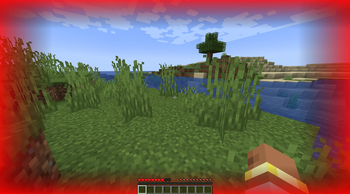
Hurt Tint – Custom Damage Vignette
Hurt Tint adds a colored vignette at the edges of the screen whenever your player takes damage. The vignette appears on top of Minecraft's default hurt effect, giving you a clear and customizable visual cue that fits your personal style.
✨ Features
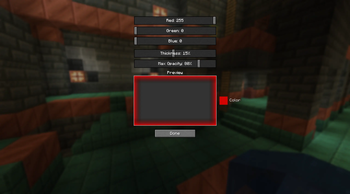
Adjustable color – RGB sliders for any vignette tint (red, blue, green, etc.).
Thickness control – from barely visible to a wide border.
Brightness control – set the vignette's starting opacity from subtle to intense.
Smooth fade – appears instantly on damage and fades out over 2 seconds.
🎮 How to configure
Open the Mods menu → select Hurt Tint.
Click the Config button.
Adjust the Red, Green, Blue, Thickness, and Max Opacity sliders — changes take effect immediately.
Press «Done» — your settings are saved for the next session.
You can also edit config/hurt_tint-client.toml manually.
- Edition: Minecraft Java
- File type: .jar
- Minecraft version listed: 1.21.1
- How to install: Install the matching mod loader (Forge, Fabric or NeoForge) for your Minecraft version. → Download the .jar. → Put it in the .minecraft/mods folder and launch that loader profile.
- Where to get it: Opens on Modrinth — not every file is mirrored on our own servers.
Install steps are the general flow for this file type — How to install Minecraft Java mods & modpacks walks through it step by step.
- Ships as hurt_tint-1.0.0.jar — drop this file into the mods folder
- Download size: 66 KB
- Download link checked 20 Oct 2026 — working
These come from our own check of the pack file, not from the source page.