
VesposLocalTrims
Java mod listed for Minecraft 1.21. Downloads from the MC Java Mods app on Android.
⬇ Download on Modrinth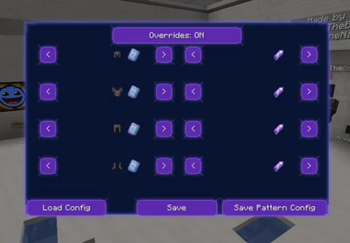
About VesposLocalTrims
Allows the player to locally load and change their armor trims client sided.
How to use
The default bind for toggling the ui is Y. The bind is changable in the keybinds menu in the minecraft settings.
just use the arrows to switch trims and ignot, and upon completion with your trimset make sure "override" (the button uptop) is enabled, and then click on the save button
How to use configs
Once finished making your trimset, you may click on the "Save Pattern config", and then choose a name and click on save. this will upload a config .json file of your trimset to .minecraft\config\VesposLocalTrims.
To load a config, click on the "Load Config" button in the ui, and then you will see a list of your existing configs. to use one, just click on the "Load" button of the config you wish to use and just click save.
- Edition: Minecraft Java
- File type: .jar
- Minecraft version listed: 1.21.11
- How to install: Install the matching mod loader (Forge, Fabric or NeoForge) for your Minecraft version. → Download the .jar. → Put it in the .minecraft/mods folder and launch that loader profile.
- Where to get it: Opens on Modrinth — not every file is mirrored on our own servers.
Install steps are the general flow for this file type — How to install Minecraft Java mods & modpacks walks through it step by step.
- Ships as localtrimchanger-1.0.0.jar — drop this file into the mods folder
- Download size: 63 KB
- Download link checked 23 Oct 2026 — working
These come from our own check of the pack file, not from the source page.