
Live Radio Mod
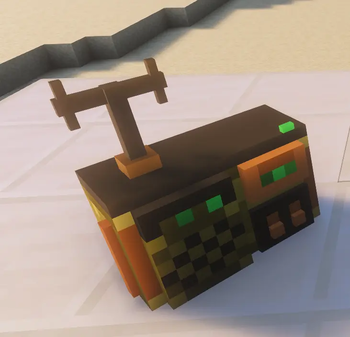
A NeoForge mod for Minecraft 1.21.1 that adds a placeable steampunk-style radio block capable of streaming real internet radio stations directly into your game world.
Features
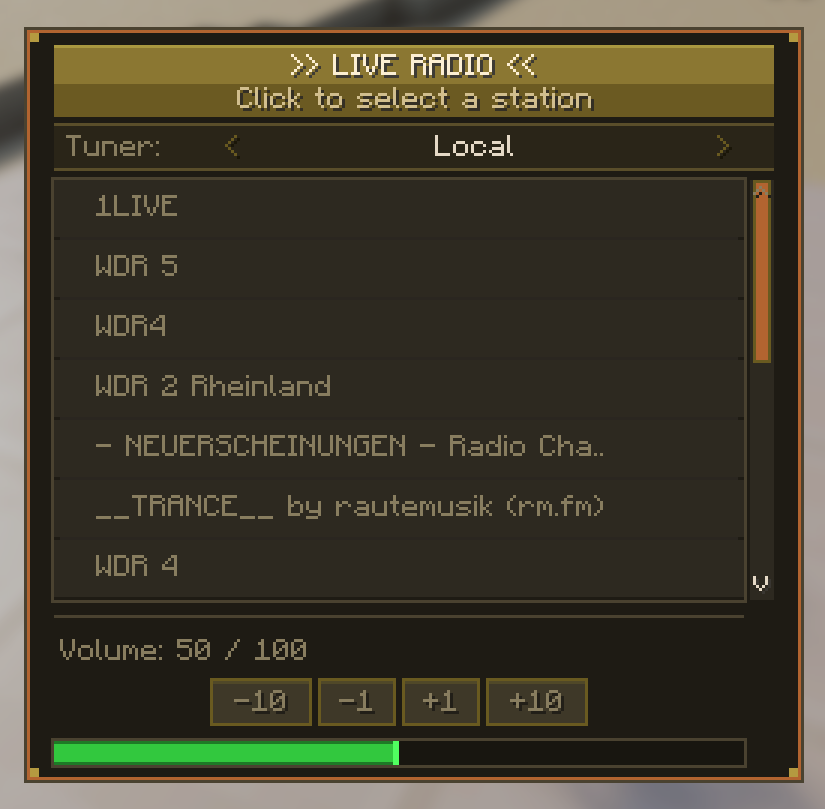
- Radio Block — a decorative block you can place anywhere in your world. Right-click it to open the station selector GUI.
- Live Internet Radio — streams real radio stations over the internet with positional 3D audio. The closer you are to the block, the louder it plays.
- Country / Region Selection — choose from a wide range of countries (Germany, USA, UK, France, Japan, South Korea, Austria, Brazil, Russia, Jamaica, Egypt, and more) and pick a station from each region.
- Dynamic Station Fetching — on the client, stations are fetched live from a radio browser API. Fallback station lists are provided for offline use.
Requirements
| Dependency | Version |
|---|---|
| Minecraft | 1.21.1 |
| NeoForge | 21.1+ |
| JEI (optional) | 19+ |
Create Aeronautics
The Radio Mod fully supports physics-based moving structures. When placed on a moving vehicle (e.g. an airship built with Create Aeronautics, the radio block moves along with it. The audio position is continuously updated to follow the block's world position, so the sound stays anchored to the radio wherever it travels.
Quick facts
- Edition: Minecraft Java
- File type: .jar
- Minecraft version listed: 1.21.1
- How to install: Install the matching mod loader (Forge, Fabric or NeoForge) for your Minecraft version. → Download the .jar. → Put it in the .minecraft/mods folder and launch that loader profile.
- Where to get it: Opens on Modrinth — not every file is mirrored on our own servers.
Install steps are the general flow for this file type — How to install Minecraft Java mods & modpacks walks through it step by step.
Verified by MCModsHub
- Ships as radiomod-1.0.2.jar — drop this file into the mods folder
- Download size: 346 KB
- Download link checked 28 Aug 2026 — working
These come from our own check of the pack file, not from the source page.