
InstantQuit
Java mod listed for Minecraft 26.x. Downloads from the MC Java Mods app on Android.
I don't know my version or loader
InstantQuit
Return to the title screen instantly when saving your world — no more waiting.
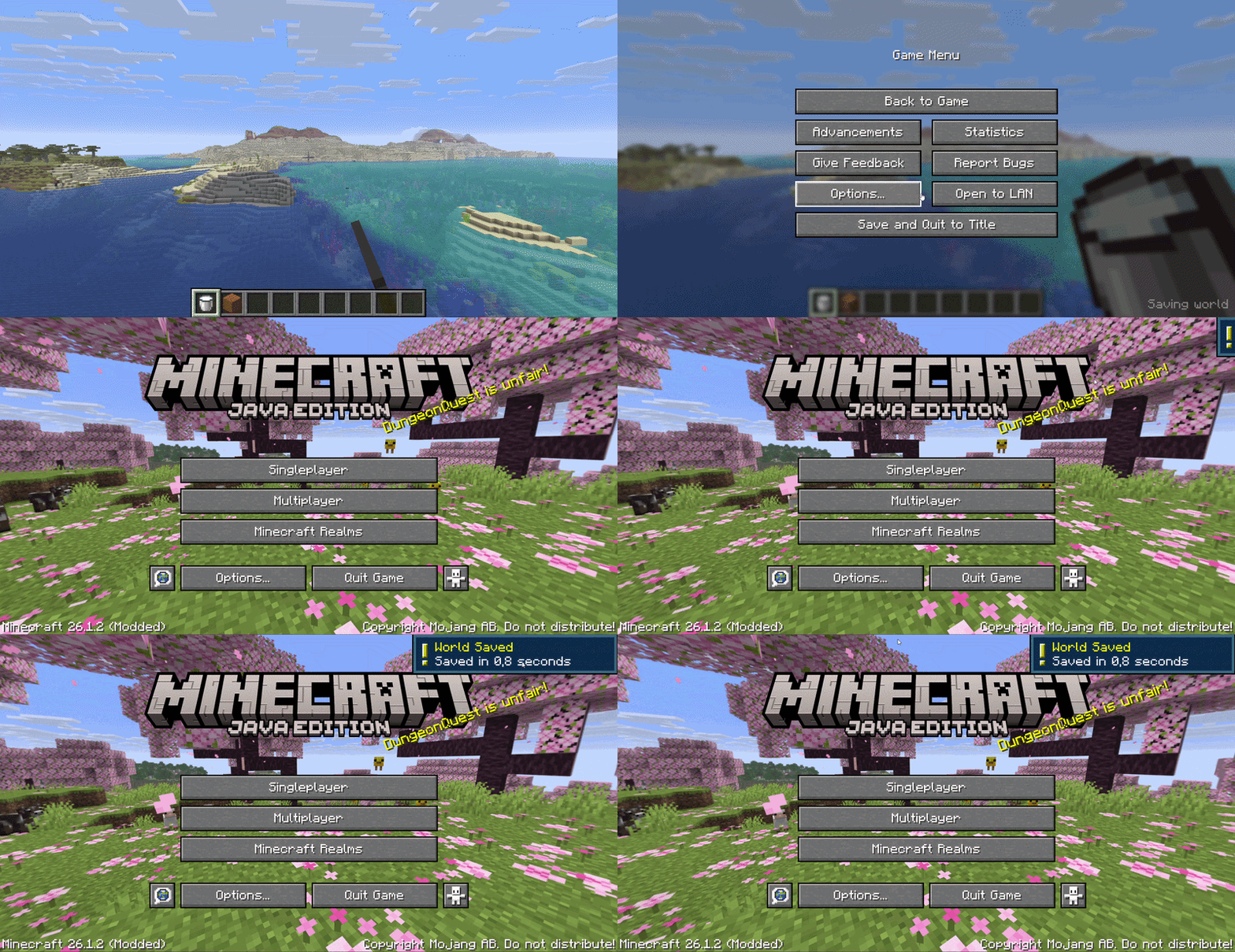
What it does
When you click "Save and Quit to Title", vanilla Minecraft shows a saving screen and blocks you until the world is fully saved. InstantQuit skips that screen entirely — you're back at the title screen immediately while your world saves in the background.
- ⚡ Instant return to title screen on quit
- 💾 Background saving — your world saves safely while you do other things
- 🔒 World locked in the world list while saving (can't be opened mid-save)
- ✅ Save time display — see how long the save took (e.g. "Saved in 1.2s")
- 🔔 Toast notification when saving completes
- ⚙️ Configurable via config file or Cloth Config screen (optional)
Configuration
Config file location: .minecraft/config/instantquit.json
| Option | Default | Description |
|---|---|---|
showToast |
true |
Show a toast notification when saving completes |
showSaveTime |
true |
Display save duration in the world list |
threadPriority |
3 |
Background save thread priority (0–10) |
If Cloth Config and Mod Menu are installed, you can configure the mod in-game from the Mods screen.
Optional
- Cloth Config — in-game config screen
- Mod Menu — access config from the Mods list
License
MIT — see LICENSE
- Edition: Minecraft Java
- File type: .jar
- Minecraft versions listed: 26.1, 26.1.1, 26.1.2
- How to install: Install the matching mod loader (Forge, Fabric or NeoForge) for your Minecraft version. → Download the .jar. → Put it in the .minecraft/mods folder and launch that loader profile.
- Where to get it: Opens on Modrinth — not every file is mirrored on our own servers.
Install steps are the general flow for this file type — How to install Minecraft Java mods & modpacks walks through it step by step.
- Ships as instantquit-1.0.0.jar — drop this file into the mods folder
- Download size: 15 KB
- Download link checked 18 Oct 2026 — working
These come from our own check of the pack file, not from the source page.