
ModsJava
Name Color Editor
Java mod listed for Minecraft 1.21–26.x. Downloads from the MC Java Mods app on Android.
Enhance your Minecraft server's identity! Name Color Editor is a lightweight Fabric mod that allows every player to express themselves by choosing a…
⬇ Download on Modrinth🎨 Name Color Editor
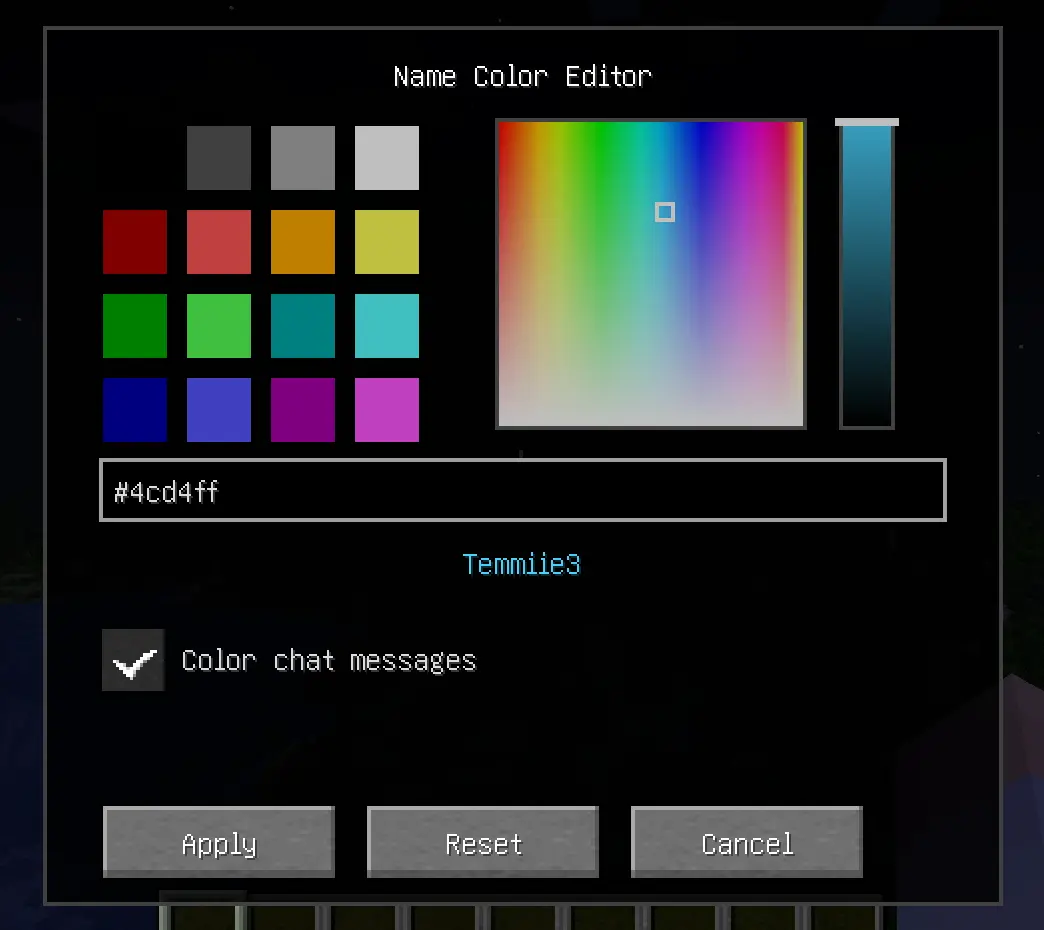
Enhance your Minecraft server's identity! Name Color Editor is a lightweight Fabric mod that allows every player to express themselves by choosing a custom color for their username and chat messages.
✨ Features
- Professional HSB Picker: Open a beautiful, clean color editor with
/namecolor.- 16 Classic Swatches: All standard vanilla Minecraft colors.
- Hue-Saturation Square: Pick any hue with precision.
- Brightness Slider: Fine-tune the luminosity of your chosen color.
- Chat Coloring Toggle: Choose between coloring just your name or both your name and chat messages.
- Responsive UI: Optimized layout that works on all screen sizes and GUI scales.
- Hex Support: Type or paste any
#RRGGBBcode for total precision. - Universal Visibility: Your chosen color is shown in:
- 💬 Chat messages (optional)
- 📜 Tab list
- 🏷️ Floating Nametags (above your head)
- Server-Side Sync: Colors are synchronized automatically across all online players.
- Persistent Storage: Your color preferences are saved to the server and persist across restarts.
🚀 Installation
🖥️ Client & Server
This mod is required on both the Client and the Server.
- Install Fabric Loader for 1.21.1.
- Download Fabric API and place it in your
modsfolder. - Place Name Color Editor in your
modsfolder.
🛠️ Commands
/namecolor: Opens the color selection GUI.
Quick facts
- Edition: Minecraft Java
- File type: .jar
- Minecraft versions listed: 1.21, 1.21.1, 1.21.2
- How to install: Install the matching mod loader (Forge, Fabric or NeoForge) for your Minecraft version. → Download the .jar. → Put it in the .minecraft/mods folder and launch that loader profile.
- Where to get it: Opens on Modrinth — not every file is mirrored on our own servers.
Install steps are the general flow for this file type — How to install Minecraft Java mods & modpacks walks through it step by step.
File checked by MCModsHub
- Ships as namecolor-1.0.0.jar — drop this file into the mods folder
- Download size: 36 KB
- Download link checked 18 Oct 2026 — working
These come from our own check of the pack file, not from the source page.