
Custom Damage Overlay Color
Java shader pack listed for Minecraft 1.20–1.21. Downloads from the MC Java Mods app on Android.
I don't know my version or loader
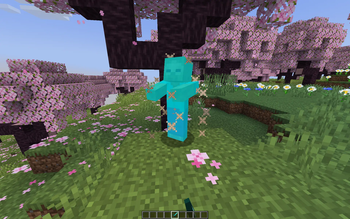
Custom Damage Overlay Color
This resource pack allows to change overlay color of all entities when they take damage. By defult this resource pack changes it to green, as an example.
Versions: 1.17 — 1.21.11
Works with both Optifine and Sodium.
How to change the color
Go into the resource pack and open a file assets/minecraft/shaders/include/change_damage_overlay.glsl, choose a color and put it into the second line of the file. For example if you want to change the color to purple (#AA00FF) with 50% transparency, the second line of the file would look like this:
vec4 RGBColor = vec4(170,0,255,127);
And if you want cyan (#00FFFF) color with the same transparency as in vanilla, it would look like this:
vec4 RGBColor = vec4(0,255,255,178);
- Edition: Minecraft Java
- File type: .zip (resource pack)
- Minecraft versions listed: 1.20.2, 1.20.3, 1.20.4
- How to install: Download the .zip resource pack — do not unzip it. → Put it in .minecraft/resourcepacks. → Enable it in Options → Resource Packs.
- Where to get it: Opens on Modrinth — not every file is mirrored on our own servers.
Install steps are the general flow for this file type — see the MC Java Mods guides for the full walkthrough.
- Downloads as Custom Damage Overlay Color.zip
- Download size: 398 KB
- Download link checked 25 Oct 2026 — working
These come from our own check of the pack file, not from the source page.