
NeoLogin
Secure NeoForge auth mod with SHA-256, on-screen UI, spectator lock, anti-grief, multi-language (EN/RU) and admin TPS/Ping monitor.
⬇ Download on Modrinth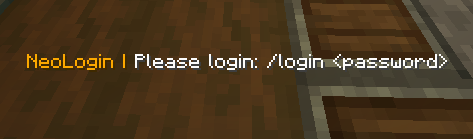

NeoLogin - Mod Description
NeoLogin is a lightweight, high-performance, and secure authorization mod for Minecraft servers running on NeoForge 1.21.1. The mod protects player accounts on offline-mode (cracked) servers by requiring authentication upon joining.
It is designed with a focus on stability under load, log security, and ease of administration.
Key Features Flexible Database Storage: Out-of-the-box support for local SQLite storage (does not require any configuration) and remote MySQL database support for multi-server networks. Database Backup and Migration: Built-in commands to export and import player databases in JSON format. This allows easy backups and seamless migration between SQLite and MySQL when scaling up the server. Pre-auth Player Locking: Unauthenticated players are temporarily switched to Spectator mode and their movement is fully restricted. They cannot move, send chat messages, execute commands, interact with the world, or take damage. Console Log Security: Automatic filtering of player passwords in console logs. During authentication or registration commands, passwords in console outputs are replaced with a secure mask (***). Offline Player Management: Ability to reset passwords or unregister accounts even when the target player is not currently online. Automatic Config Migrator: Internal version tracking automatically updates the structure of the configuration file upon mod updates, preventing broken configurations and duplicate parameter bugs.
Mod Commands
Player Commands
- /register - Register a new account.
- /login - Authenticate upon joining the server.
- /changepassword - Change your current account password.
Admin Commands (Requires permission neologin.admin or OP Level 2)
- /neologin backup - Export the entire player database to a JSON backup file.
- /neologin backups - List all available backup files on the server.
- /neologin restore "filename" - Import player accounts from a selected backup file.
- /neologin unregister - Delete a player account, resetting their registration status.
- /neologin setpassword - Forcefully set a new password for a player.
- /neologin reload - Reload configuration file settings without restarting the server. Database Configuration The configuration file is located at config/neologin-server.toml. You can configure the database type and connection parameters in the database block:
  [Database]
  	Type of database to use. Allowed values: 'sqlite' or 'mysql'.
  	databaseType = "sqlite"
 	Connection parameters (only used when databaseType is 'mysql')
 	mysqlHost = "localhost"
 	mysqlPort = 3306
	mysqlDatabase = "neologin"
	mysqlUsername = "root"
	mysqlPassword = "password"
- Edition: Minecraft Java
- File type: .jar
- Minecraft version listed: 1.21.1
- How to install: Install the matching mod loader (Forge, Fabric or NeoForge) for your Minecraft version. → Download the .jar. → Put it in the .minecraft/mods folder and launch that loader profile.
- Where to get it: Opens on Modrinth — not every file is mirrored on our own servers.
Install steps are the general flow for this file type — How to install Minecraft Java mods & modpacks walks through it step by step.
- Ships as neologin-1.1.1.jar — drop this file into the mods folder
- Download size: 16.3 MB
- Download link checked 6 Sept 2026 — working
These come from our own check of the pack file, not from the source page.