
Hide Your Server IP (HYSI)
Built for streamers, content creators and server owners who want to keep their server IP private.
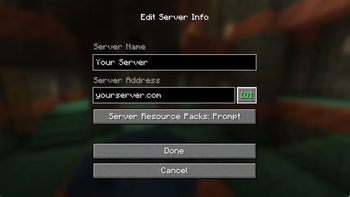
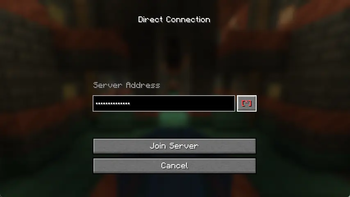
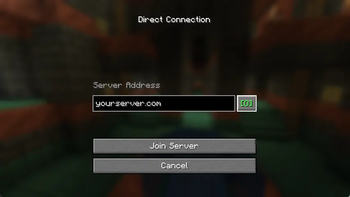
HYSI masks server IP addresses with bullet points (•••••••••) in every Minecraft multiplayer screen. A single click reveals or hides the address — just like a password field in a browser.
Why?
Accidentally leaking a server IP during a live stream can expose the server to DDoS attacks or unwanted visitors. With HYSI installed the IP is hidden by default. You reveal it intentionally, never by accident.
How it works
| Screen | Behaviour |
|---|---|
| Direct Connect | IP field starts masked — click [*] to reveal |
| Add Server | IP field starts masked — click [*] to reveal |
| Edit Server | IP field starts masked — click [*] to reveal |
- [*] (red) → IP is hidden
- [O] (green) → IP is visible
Download
Grab the latest release from the Releases page.
Client-side only — install only on your own game client, not on the server.
License
Copyright (c) 2025 exnfachjan. All rights reserved.
Made with ❤️ by exnfachjan
- Edition: Minecraft Java
- File type: .jar
- Minecraft version listed: 26.2
- How to install: Install the matching mod loader (Forge, Fabric or NeoForge) for your Minecraft version. → Download the .jar. → Put it in the .minecraft/mods folder and launch that loader profile.
- Where to get it: Opens on Modrinth — not every file is mirrored on our own servers.
Install steps are the general flow for this file type — How to install Minecraft Java mods & modpacks walks through it step by step.
- Ships as hysi-mc26.2-1.0.0+mc26.2.jar — drop this file into the mods folder
- Download size: 26 KB
- Download link checked 29 Sept 2026 — working
These come from our own check of the pack file, not from the source page.