
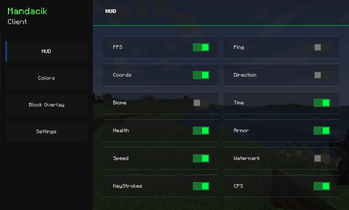
PLEASE SET BACKGROUND BLUR TO 0 IN "Video Settings" TO SEE HUD SETTINGS
Dependencies ❗
- 📝 Fabric: Fabric API (Required), In-Game Account Switcher (Required)
A lightweight Fabric client mod that adds a fully customizable HUD and a beautiful custom title screen!
✨ Features
📊 HUD (Heads-Up Display)
- ⚡ FPS Counter – always know your performance
- 📡 Ping Display – see your connection quality with color coding
- 🗺️ Coordinates – X, Y, Z always visible
- 🧭 Direction – know where you're heading
- 🌿 Biome Display – see your current biome
- 🕐 Time Display – in-game time with period (Morning/Afternoon/Evening/Night)
- ❤️ Health Display – color coded health bar
- 🛡️ Armor Display – current armor points
- 💨 Speed Display – real-time movement speed in blocks/second
- 💧 Watermark – stylish client watermark in top-right corner
- ⌨️ KeyStrokes – see your key presses in real time
- 🖱 CPS Counter - see your click presses in real time
- 🟩 Block Overlay - shows color at the block you looking at
🎨 Customization
- 🖼️ 6 HUD border colors – Blue, Green, Red, Yellow, Pink, White
- 🖼️ 6 Block Overlay colors – Blue, Green, Red, Yellow, Pink, White
- 🔧 Toggle every HUD element individually
- 💾 Config auto-saves – your settings are always remembered
🌍 Languages
- 🇵🇱 Polish language support
- 🇬🇧 English language support
- 🔄 Switch language anytime in settings
🎬 Title Screen
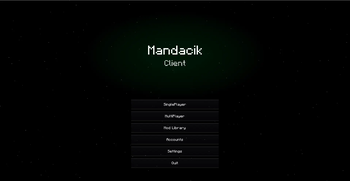
- ⭐ Animated star field with parallax effect
- 🌌 Nebula effects that react to your HUD color
- 🌠 Aurora animations
- ✨ Shooting stars
- 🎯 Custom buttons – Singleplayer, Multiplayer, Mod Library, Options, Quit
📦 Mod Library
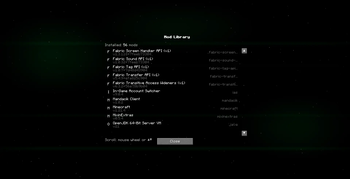
- 📋 List of all installed mods
- 🔍 Mod name, version and ID
- 🖱️ Smooth scrolling with mouse wheel
🐛 Bugs & Suggestions
Found a bug? Have an idea? Let me know in the Issues section!
Made with ❤️ by Mandacik
Quick facts
- Edition: Minecraft Java
- File type: .jar
- Minecraft version listed: 1.21.4
- How to install: Install the matching mod loader (Forge, Fabric or NeoForge) for your Minecraft version. → Download the .jar. → Put it in the .minecraft/mods folder and launch that loader profile.
- Where to get it: Opens on Modrinth — not every file is mirrored on our own servers.
Install steps are the general flow for this file type — How to install Minecraft Java mods & modpacks walks through it step by step.
Verified by MCModsHub
- Ships as mandacik-client-1.0.3.jar — drop this file into the mods folder
- Download size: 110 KB
- Download link checked 11 Sept 2026 — working
These come from our own check of the pack file, not from the source page.