
Flow EloTagger
Java mod listed for Minecraft 1.21. Downloads from the MC Java Mods app on Android.
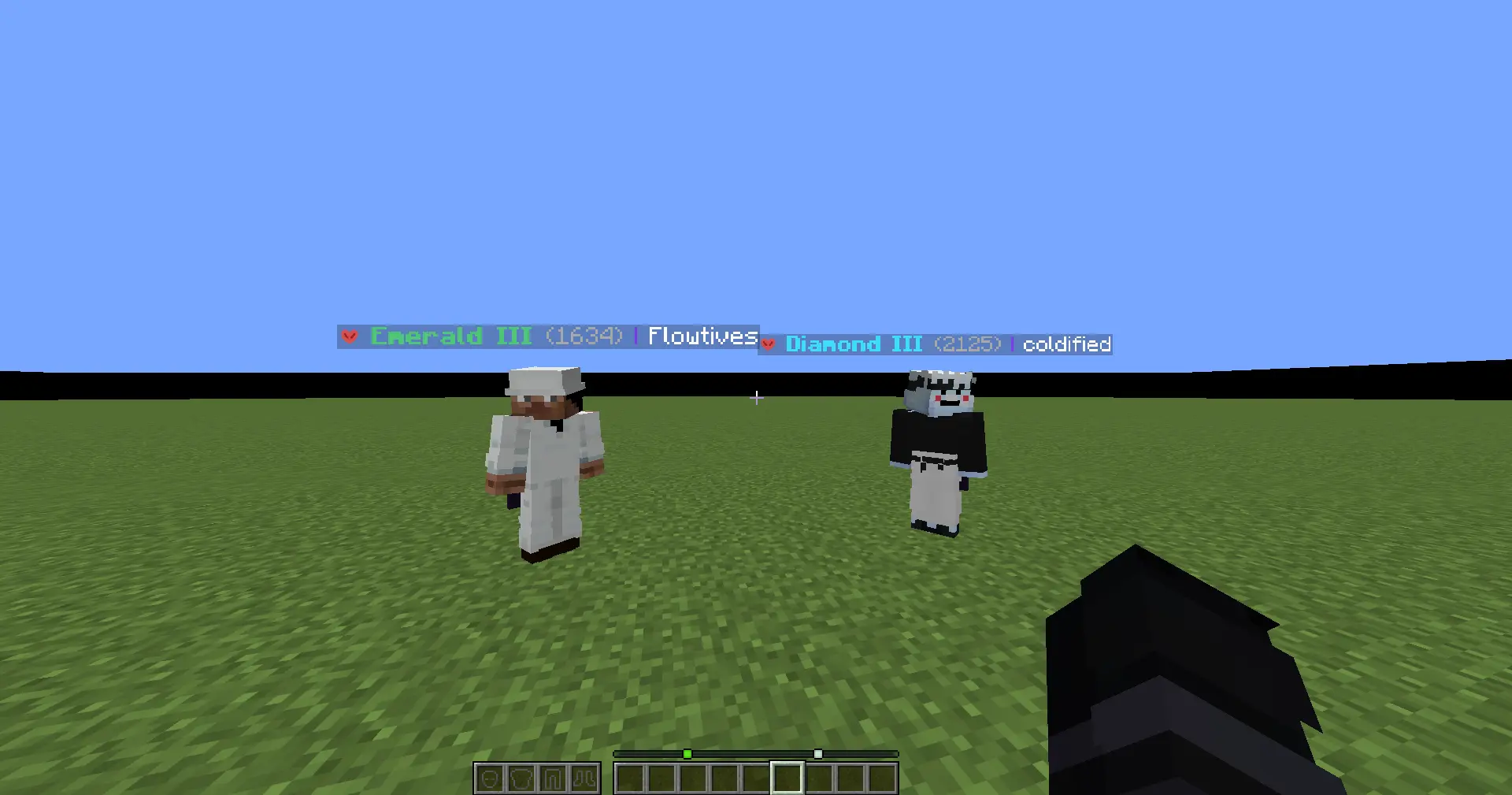
Flow EloTagger is a client-side Fabric mod that shows FlowPvP ranks, ELO, and gamemode icons directly in player nametags, tab list, and profile search…
⬇ Download on Modrinth
Flow EloTagger
Flow EloTagger brings FlowPvP ranks directly into Minecraft.
Instead of checking profiles outside the game, you can see player rank, ELO, and gamemode icons while you play. Whether you're fighting, spectating, checking lobbies, or just curious about who you're facing, the information is right there in-game.
[!IMPORTANT] Disclaimer: This is an independent project and is not an official mod by FlowPvP. It is a community-driven tool developed to enhance the player experience using public data.
What it does
Flow EloTagger connects to FlowPvP ranking data and displays it in a clean, lightweight, and configurable way.
You can show:
- A selected gamemode rank
- The highest rank automatically
- All available ranks for a player
It also supports gamemode icons, so modes are easier to recognize at a glance.
Features
- Rank and ELO displayed above player nametags
- Tab list integration
- Gamemode icons for:
- Sword
- Axe
- UHC
- Vanilla
- Mace
- Diamond Pot
- Netherite OP
- SMP
- Diamond SMP
- Configurable display modes
- In-game player search screen
- Mod Menu config support
- Request caching and rate limiting for better performance
Why use it?
FlowPvP is competitive, and fast information matters.
Flow EloTagger helps you instantly understand who you're fighting without opening websites or checking stats manually. It is built to make rank information feel natural inside Minecraft, not like a separate tool.
Requirements
- Minecraft
1.21.11 - Fabric Loader
- Fabric API
- Mod Menu recommended
Notes
- This is a client-side mod
- It uses FlowPvP API endpoints to fetch ranking data
- Requests are cached to reduce unnecessary API spam and improve responsiveness
- Edition: Minecraft Java
- File type: .jar
- Minecraft version listed: 1.21.11
- How to install: Install the matching mod loader (Forge, Fabric or NeoForge) for your Minecraft version. → Download the .jar. → Put it in the .minecraft/mods folder and launch that loader profile.
- Where to get it: Opens on Modrinth — not every file is mirrored on our own servers.
Install steps are the general flow for this file type — How to install Minecraft Java mods & modpacks walks through it step by step.
- Ships as FlowTierTagger-2.5.0+mc1.21.11.jar — drop this file into the mods folder
- Download size: 3.1 MB
- Download link checked 19 Oct 2026 — working
These come from our own check of the pack file, not from the source page.