ArmorStandRedaction
Java mod listed for Minecraft 1.21. Downloads from the MC Java Mods app on Android.
⬇ Download on Modrinth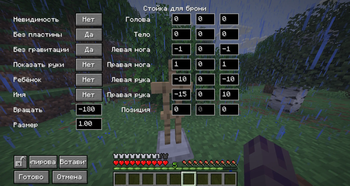
Armor Stand Redaction 🚨 Please notify me if you are installing this mod on a server. Specific configuration will be required—please provide the server IP address as well. ✨ Experience Total Control Armor Stand Redaction is a comprehensive utility designed to push the boundaries of what is possible with armor stands in your world. This mod provides a sophisticated suite of tools for players and creators who demand precision and creative freedom beyond the vanilla limitations. 🛠️ Advanced Manipulation & Usage Tired of static, lifeless displays? Armor Stand Redaction introduces a new layer of interaction. To open the management menu, simply use Shift + Right-Click on an armor stand. While the core mechanics remain intuitive, the underlying system allows for granular adjustments that were previously inaccessible. Whether you are building a grand museum, a cinematic scene, or a complex decorative environment, this tool adapts to your creative vision. 🔍 Key Features (Overview):
Quick Access: Open the configuration interface instantly with Shift + Right-Click.
Precision Refinement: Fine-tune every aspect of your armor stands with surgical accuracy.
Visual Transformation: Go beyond basic posing; redefine how equipment and entities are presented.
Workflow Optimization: Designed for both quick adjustments and deep, methodical scene building.
Intuitive Interface: A powerful yet seamless experience that integrates directly into your creative process.
⚠️ License and Copyright All Rights Reserved © 2025 Khai This mod is proprietary software. By installing or using this mod, you agree to the following terms:
No Modification: You are strictly prohibited from modifying, decompiling, or reassembling the source code and assets (models, textures) of this mod.
No Addons: Creating any additions, addons, or extensions that utilize the code or assets of Armor Stand Redaction is prohibited without the express written consent of the author (Khai).
No Redistribution: You may not upload this mod's files to third-party websites. Distribution is only permitted via the official link on Modrinth.
- Edition: Minecraft Java
- File type: .jar
- Minecraft version listed: 1.21.10
- How to install: Install the matching mod loader (Forge, Fabric or NeoForge) for your Minecraft version. → Download the .jar. → Put it in the .minecraft/mods folder and launch that loader profile.
- Where to get it: Opens on Modrinth — not every file is mirrored on our own servers.
Install steps are the general flow for this file type — How to install Minecraft Java mods & modpacks walks through it step by step.
- Ships as ArmorStandRedaction.jar — drop this file into the mods folder
- Download size: 144 KB
- Download link checked 24 Oct 2026 — working
These come from our own check of the pack file, not from the source page.