
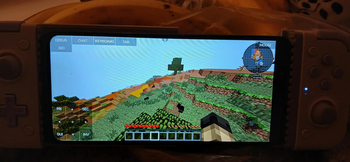
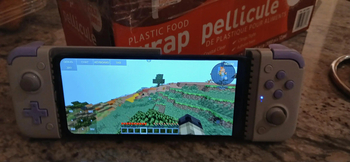
This is a simple and lightweight modpack specifically intended for use with the PovajLauncher application allowing Android users to play Java Edition & Modded Minecraft on their smartphones.
Modlist is based on the Thaumcraft Enhanced modpack.
Alongside these mods the pack also features some newer add-ons such as Thaumic Bases (as well as well-known older add-ons such as Thaumic Horizons & Thaumic Upholstry (check mod. Pack includes both Aether Legacy and Botania mods alongside the core gameplay of Thaumcraft and it's extenstive add-ons.
This mod also makes use of Rozmir's scripts found here in Thaumcraft Aspects Re-Tweaked for cross-mod compatibility.
Version 1.0.1 also makes use of Zyin055's Symbiotic Botania and Thaumcraft customizations as well as Nostalgic World Gen by karnimani_guy
This version is NOT YET RELEASED, as I need to fix the script errors, so sorry about any inconveniences.
_Botania tiers: tier 1 flowers runic alter alchemy catalyst tier 2 flowers elven conjuration catalyst gaia
Thaumcraft tiers: arcane worktable alchemy infusion golems eldritch
Tier 1: thaumcraft - arcane worktable botania - runic alter, alchemy catalyst, tier 1 flowers Tier 2: thaumcraft - alchemy Tier 3: thaumcraft - infusion botania - tier 2 flowers Tier 4: botania - elven Tier 5: thaumcraft - golems, eldritch botania - gaia _
Enjoy :)
Mods adding content:
- The Aether by bconlon, Oscar Payn, Hugo Payn, JellySquid
- Automagy by Tuhljin (programming, art), Draanor (art)
- Biomes o' Plenty by Adubbz, Amnet, Forstride, ted80
- Botania by Vazkii
- Forbidden Magic by Spiteful_Fox
- Iventory Crafting + Inventory Tweaks
- Keep Inventory, Lose XP On Death by Rozmir
- Nodal Mechanics by Shukaro
- Nostalgia Gen by karnimani_guy
- Tainted Magic by tadashi_3
- TC Inventory Scanning by BlayTheNinth
- TC Node Tracker by Dyonovan
- TC Research-Helper by Knoxz
- Thaumaturgical Knowledge by Doctor_Benway
- Thaumic Bases
- Thaumic Infusion by DrunkMafia
- Thaumic Tinkerer by gaeakat
- Thaumic Upholstry by EtsyTheDragon
- Thaumic Horizons by Kentington
- Traveller's Gear by BluSunrize
- Witching Gadgets by BluSunrize
- Waila By profmobius
Additional Attribution Links / Credits:
- Tainted Magic by tadashi_3: https://www.curseforge.com/minecraft/mc-mods/tainted-magic
- Thaumic Bases by gaeakat _ForgeUser9083808: https://www.curseforge.com/minecraft/mc-mods/thaumic-bases
- Thaumic Tinkerer by : https://www.curseforge.com/minecraft/mc-mods/thaumic-tinkerer
- Witching Gadgets by BluSunrize : https://www.curseforge.com/minecraft/mc-mods/witching-gadgets
- Waila by profmobius : [https://www.curseforge.com/minecraft/mc-mods/waila
- DummyCore By _ForgeUser9083808
- Thaumcraft By Azanor13
Another recommended mod that I am unable to include in the pack is Inventory Crafting Grid to simplify crafting for mobile players,
NOTE: This modpack does not include performance mods on its own but it is recommended to download Optifine and add it to Povajlauncher or desktop
Installation Instruction for Android users:
Install "PovajLauncher" from Play Store, add Microsoft Account.
Click on arrow above "Play" -> Create New Profile
Select "Create Forge Profile" -> 1.7.10-10.13.4.1614 , wait for setup to finish.
Download or Install Content of the Modpack to PC
Connect your phone via USB cable to start File Transfer
Navigate to Your PC\Your Phone\Internal shared storage\Android\data\net.kdt.pojavlaunch\files.minecraft
Drag & drop config, mods, scripts (required)
Obtain Optifine_MOD .jar from Optifine.net & add to "mods" folder (Optional but recommended)
Obtain Faithful 32x modded textures embedded from F32Organization and add to resourceparks (Optional)
Disconnect the cable, Launch and wait for client to start Minecraft 1.7.10, it will ask you to setup your controller buttons if you are using one (images in gallery of the modpack setup with a Moto G04)
- Edition: Minecraft Java
- File type: .jar
- Minecraft version listed: 1.7.10
- How to install: Install the matching mod loader (Forge, Fabric or NeoForge) for your Minecraft version. → Download the .jar. → Put it in the .minecraft/mods folder and launch that loader profile.
- Where to get it: Opens on Modrinth — not every file is mirrored on our own servers.
Install steps are the general flow for this file type — How to install Minecraft Java mods & modpacks walks through it step by step.
- Downloads as TC4 Enhanced - FINAL RELEASE 1.0.mrpack
- Download size: 31.6 MB
- Download link checked 28 Aug 2026 — working
These come from our own check of the pack file, not from the source page.