
LiteCraft
Java modpack listed for Minecraft 1.20. Downloads from the MC Java Mods app on Android.
⬇ Download on Modrinth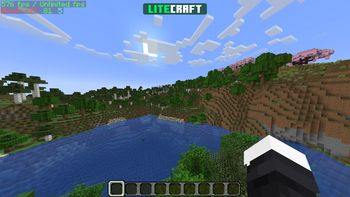
⚡ LiteCraft
A mod-pack which aims to optimise Minecraft by adding multiple mods which alter the games mechanics - the Essential mod is also added by default so you can instantly start playing with your friends, without any custom set-up, and with working voice chat.
🖥️ Installation Guide
Note: These are just recommended steps - of course, there are other methods of installing this.
1. Install the Modrinth App
Get the Modrinth App and ensure it's installed.
2. Login to your Microsoft Account
Ensure that you are logged in, add your Microsoft Account from the top-left menu on the application.
3. Install LiteCraft
Click the search icon on the sidebar, make sure the Modpacks tab is selected, and search for "LiteCraft"; once you find it, press Install.
4. Launch LiteCraft
Click on the books icon on the sidebar, and you can see if the mod-pack is available; once it is, you may launch it and start playing.
⌨️ In-Game Key Binds
See All Key BindsMovement
- Space Jump
- Left Control Sneak
- Left Shift Sprint
- W Walk Forwards
- S Walk Backwards
- A Strafe Left
- D Strafe Right
Gameplay
- Mouse Button 1 Attack/Destroy
- Mouse Button 2 Use Item/Place Block
- Mouse Button 3 Pick Block
Inventory
- G Drop Selected Item
- 1-9 Switch Hotbar Slot
- E Toggle Inventory
- F Swap Item With Offhand
Multiplayer
- Tab List Players
- T Open Chat
- / Open Command
Miscellaneous
- L Advancements
- F2 Take Screenshot
- V Toggle First/Third Person
Voice Chat
- H Voice Chat GUI
- J Mute Microphone
Iris
- N Toggle Shaders
Essential
- C Zoom
- P Open Friends GUI
- Q Open Emote Wheel
- I Screenshot Manager
⛏️ Want something more realistic?
Try RealCraft, a realistic mod-pack primarily focused on graphical and quality-of-life additions.
- Edition: Minecraft Java
- File type: .jar
- Minecraft version listed: 1.20.6
- How to install: Install the matching mod loader (Forge, Fabric or NeoForge) for your Minecraft version. → Download the .jar. → Put it in the .minecraft/mods folder and launch that loader profile.
- Where to get it: Opens on Modrinth — not every file is mirrored on our own servers.
Install steps are the general flow for this file type — How to install Minecraft Java mods & modpacks walks through it step by step.
- Downloads as LiteCraft 2.9.mrpack
- Download size: 1.1 MB
- Download link checked 9 Oct 2026 — working
These come from our own check of the pack file, not from the source page.