
Ranked Optimized
Extreme optimization, for the best performance for PvP or SMPs, w/ mods you'll need for an advantage without cheats or hacks. Reach high ranked tiers in…
⬇ Download on Modrinth
Ranked Optimized


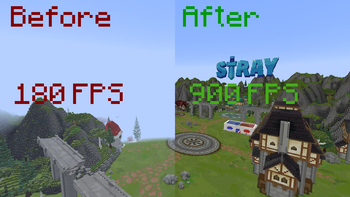
Extreme optimization, for the best performance for PvP or SMPs, w/ mods you'll need for an advantage without cheats or hacks. Reach high ranked tiers in modes like Crystal, Mace, Sword, Pot, Hoplite, Hypixel etc with Sodium and more in one mod pack, reaching fast amounts of FPS.
Modpack created by a top player striving the smoothest and most well-configured optimization.
⚠️ Why use this pack instead of just copying the mods? Anyone can throw performance mods into a folder, but we go much further. Every single mod in this pack has been meticulously fine-tuned and deeply configured at the core level to squeeze out every drop of performance and eliminate micro-stutters. Building a custom pack with the exact same mod list will NEVER yield the same FPS, hit-reg, or stability.
Discord: https://discord.gg/8pVfJJSkRA
Mod list last updated: V1.0.10
🚀 Quick Start Guide
- Keybinds: All keybinds are fully reset so you can configure them yourself.
- RAM Allocation: Optimized for 10GB RAM. Allocating more (like 14GB) often causes Garbage Collection to stutter; 10GB is the current stable recommendation.
- Performance Toggle: If you are on an older PC (pre-2012 GPU), remove ThreatenGL to avoid crashes.
- Configuration: Most mods are pre-configured and require no changes unless desired.
⚡ Performance Mods
High Priority
- Sodium – Mandatory rendering engine rewrite for massive FPS gains.
- Sodium Extra - Extra performance tweaks for Sodium.
- ModernFix / ModernFix-mVUS – All-in-one performance "catch-all" that fixes memory leaks and speeds up loading.
- Krypton - Network optimizations for better server connections.
- LazyDFU - Defers DataFixerUpper initialization for faster game startup.
- Noisium - Optimizes world generation performance to reduce lag spikes.
Medium Priority
- ScalableLux – Optimizes the lighting engine to reduce stuttering and improve FPS.
- ThreatenGL – Modern OpenGL optimizations (remove on pre-2012 GPUs).
- Exordium – Limits GUI FPS to improve overall performance.
- Voxy (DISABLED) - LoD Renderer
- Bobby – Higher render distance via chunk caching.
- GpuTape – Optimizes GPU memory and utilization.
- Ixeris - Entity rendering optimizations for better FPS in crowded areas.
Core & System Optimizations
- FerriteCore – Massive memory usage reduction.
- Lithium – CPU optimizations for game logic.
- C2ME – Multi-threaded chunk loading.
- ImmediatelyFast – Optimizes HUD, entities, and text rendering.
- EntityCulling / More Culling – Stops rendering unseen objects.
- BadOptimizations – Miscellaneous micro-optimizations.
- ThreadTweak - Improves CPU thread scheduling for Minecraft.
- Optiboxes - Optimizes shulker box rendering. (1.21.8 Only)
Low Priority
- Very Many Players (VMP) – Improved performance on high player counts.
- Borderless Fullscreen – Easier alt-tabbing without FPS loss.
⚔️ PvP Mods
High Priority
- ClienThings – Fixes high-ping desync - USE WITH CAUTION! (BANNED ON MACE).
- Health Indicators – Shows enemy health (allowed on most servers).
- Armor HUD / Numbers – Clean durability and armor displays.
- InventoryHUD+ (DISABLED) – Alternative to other HUD mods in this modpack.
- Uku's Armor HUD - Another customizable alternative for your armor HUD. (Enabled in 1.21.8, Disabled in 1.21.11)
- BetterHurtCam - Highly configurable hurt-cam (old/yaw-based/no-hurtcam).
- BactroMod – Fog control, brightness, shield/fire offsets.
- Effect Timer Plus - Shows your status effects and when they are about to end.
- AppleSkin – Hunger and saturation overlay (health overlay disabled).
- PingNameTags / NameTagPing - Shows the pings of nearby players on their name tag. Useful in PvP. (Enabled in 1.21.11, Disabled in 1.21.8)
Medium Priority
- Shield Fixes – Shield behavior fixes. Allowed on 99% of PvP servers.
- Combat Hitbox / Prettier Hitboxes – Customizable hitbox colors.
- Crosshair Addons - Highly customizable crosshair with customizable indicators.
- Advanced Mouse Sensitivity - Fine-tune mouse sensitivity settings for better accuracy.
Low Priority
- Marlow’s Crystal Optimizer – Legal crystal PvP optimizations. Allowed on most servers.
- TotemCounter – Tracks opponent totem pops.
- Hero’s Anchor Optimizer – Optimized anchor mechanics for PvP. Allowed on most servers.
🛠️ Quality of Life (QOL)
Medium Priority
- Essential Mod – Friends, messaging, and world invites.
- Freecam (Fair Play) – Freecam that is allowed on most servers.
- ViaFabric / ViaVersion / ViaBackwards – Join servers across versions.
- Mod Menu - Required to configure each mod
- FullBright - Full bright. Yes.
- BetterF3 – Cleaner, readable debug screen.
- Perspektive – Look around without moving your player.
- Zoomify – Fully configurable zoom.
- Xaero's World Map (DISABLED) - World map that logs as you move throughout
- Xaero's Minimap (DISABLED) - Minimap that shows your surroundings
- Simple Update Checker - In-game alerts for new modpack updates.
Low Priority
- Reese's Sodium Options – Better Sodium settings menu with a tabbed interface.
- Controlling – Adds search functionality and conflict filters to the keybinds menu.
- Horizon Fix – Removes the visible gap/line at the horizon.
- Custom Window Title – Adds custom modpack branding to the game window.
- Dark Window Bar - Makes the Windows title bar match the dark theme.
- Shulker Box Tooltip – View contents without opening.
- Simple Voice Chat – Proximity voice chat for SMPs.
- WorldEdit / WorldEdit CUI – Advanced building tools.
- Creative Fly / Flyspeed – Faster creative flight.
- Smooth Scrolling Refurbished – Modern menu scrolling.
- Client Time - Allows modifying client-side game weather and time
- Better "Add Server" - Auto-renames the server to the IP, moving the IP to the top in "Add Server".
- Better Tab - Improves Tab UI.
- BoatView360 - Look around freely without turning the boat.
- ChatPatches - Fixes and improvements for the vanilla chat interface.
- Dynamic Lights - Makes a held object emit light when it is in the hand/off-hand.
- Emoji Type - Easily use and autocomplete emojis in game chat.
- HorseStatsMod - Displays the speed, jump height, and health of horses.
- No Realms Button - Removes the useless realms button.
- No ResourcePack Warnings - Removes the annoying warning for older resource packs.
- No Worldborder Tint - Removes the annoying red tint when you're near the world border.
- Not Enough Animations - Adds missing third-person animations (eating, drinking, etc).
- RidingMouseFix - Fixes mouse stutter and locking when riding entities.
- Server Pack Unlocker - Stops servers forcing you to use their resource packs (MCCI, Stray, Minehut, etc).
- ShutUpNarrator - Disables the accidental narrator hotkey completely.
- Tiers (DISABLED) - Shows the tier of a player on their nametag and introduces
/tiers <player>command. Useful in PvP. - View Bobbing Options - Customizable view-bobbing
⚙️ Technical & Minor Tweaks
- Async Pack Scan – Stops the game from hanging when opening the resource pack folder.
- Auth Me – Skips unnecessary restart messages.
- Clean View – Removes your own potion particles. (1.21.8 Only)
- Fadeless – Removes loading screens and fades.
- FastQuit – Quit worlds and go to the menu while they're saving in the background.
- In-Game Account Switcher – Quickly swap accounts.
- Iris Shaders – Shader support.
- No Chat Reports – Privacy and UI cleanup.
- No Telemetry - Stops Mojang from tracking your data, also improving performance.
- Skyboxify – Locked to V1.7 for maximum stability. DO NOT UPDATE!. (1.21.11 Only)
- No Internet - Removes the multiplayer internet warning screen. (1.21.8 Only)
- ServerAddressSpaceFix – Fixes server IP spacing issues.
- Carpet / Carpet TIS Addition - Very useful for some technical players and other mods
- Fast IP Ping - Pings multiplayer servers faster
- Server Pinger Fixer – Makes the server list ping/refresh faster and more reliably.
- Remove reloading screen - Removes the reloading screen when reloading resource packs.
- YOSBR (Your Options Shall Be Respected) - Preserves the default modpack configuration files.
📚 Libraries & Resources
Core Libraries
- libjf – Essential utility library.
- Core APIs: Fabric API, Architectury API, Fabric Language Kotlin, Forge Config API Port, Async Fabric, WalksyLib
- Config Libraries: YACL, Cloth Config, MidnightLib, Fzzy Config, Balm, Searchables, Text Placeholder API, ukulib, Utilize
- Palladium - Core library for some mods. (1.21.8 Only)
- ToadLib - Essential utility library. (1.21.8 Only)
Resource Packs
- QOL: Small Held Items, Unique Dark, Fast Better Grass, Alternative Rain Sounds, No Foliage, Dark GUI Vanilla Tweaks, Transparent GUI Vanilla Tweaks, Hypixel Background (by Secps), Brewing Guide Vanilla Tweaks,
Shaders
- Bliss Shaders (Really good visuals, high performance).
- Photon with Voxy.
❓ Frequently Asked Questions
Can't I just copy these mods and make my own pack?
You could, but you won't get performance anywhere near this modpack's performance. We haven't just dragged and dropped these mods into a folder; we have deeply configured them, adjusted hidden parameters, and fine-tuned interactions at the code level to ensure maximum FPS and stability. A custom pack with the exact same mod list will run significantly worse.
Do I need to change anything after downloading?
Yes, but not much. You'll only have to put your personal settings; FOV, sensitivity, controls. The rest is already configured and set up for the most optimized gameplay experience.
My mods are not updated; should I update the mods?
No, we highly do not recommend updating the mods as we've picked out the most stable and compatible versions of each mod, for maximum performance. We do not recommend mindlessly updating all mods. They are this way as intended and resolve other issues from arising.
Why is my UI dark and my hand item small, etc?
This modpack has pre-installed resource packs. Please, check your resource packs before playing.
I want to suggest a mod but it crashes the modpack; can you include the mod in the next version?
Feel free to contact us on Discord by messaging @Secps, and we'll look into your request. Chances are if the mod isn't conflicting with the core of the modpack, not already added etc, and we approve of it, we'll add it!
Game crashes on startup?
If you are using a GPU made before 2012, you must remove the ThreatenGL mod from the folder.
Is this pack bannable?
No, as it uses "Fair Play" mods and optimizations. However, use ClienThings with caution as it MAY be banned on some servers.
Why's my crosshair white?
The mod Exordium limits your GUI's FPS. However, as a side effect, your crosshair will be white. Disable the mod to enable default crosshair transparency again.
Why 8-10GB RAM?
Allocating 14GB+ causes stutters during garbage collection*; 10GB is the stable sweet spot for this pack.
⚡ GraalVM setup (HIGHLY RECOMMENDED - BUTTER SMOOTH)
How to set-up GraalVM for extreme performanceUsing GraalVM makes your game feel significantly smoother during gameplay, providing benefits beyond simple FPS gains.
- Download: Download GraalVM for JDK 21 from the direct link.
- Extract: Paste the ZIP file into a folder and select "Extract Here." You may delete the ZIP file afterward.
- Locate: Navigate into the
bin/folder and find thejavaw.exefile. Copy the full file path. - Modrinth Configuration: Open Modrinth and click the Gear Icon (bottom left).
- Go to Java Installation.
- Paste the copied path into the Java 21 Location parameter.
- Windows Graphics Settings:
- Go to System > Display > Graphics.
- Add
javaw.exeto your applications. - Set it to High Performance.
- JVM Arguments:
- Locate the Java and Memory section for the modpack in Modrinth.
- Paste the following into the Java Arguments field:
-Xmx10G -XX:+UseG1GC -XX:+ParallelRefProcEnabled -XX:MaxGCPauseMillis=200 -XX:+UnlockExperimentalVMOptions -XX:+DisableExplicitGC -XX:+AlwaysPreTouch
Relaunch the game once these steps are completed.
Having any issues? Contact me on Discord! @Secps
Resource packs from: https://vanillatweaks.net Icons used in this project are by LopyMine, licensed under CC BY-ND 4.0.
- Edition: Minecraft Java
- File type: .jar
- Minecraft version listed: 1.21.11
- How to install: Install the matching mod loader (Forge, Fabric or NeoForge) for your Minecraft version. → Download the .jar. → Put it in the .minecraft/mods folder and launch that loader profile.
- Where to get it: Opens on Modrinth — not every file is mirrored on our own servers.
Install steps are the general flow for this file type — How to install Minecraft Java mods & modpacks walks through it step by step.
- Downloads as Ranked Optimized 1.1.4.mrpack
- Download size: 23.8 MB
- Download link checked 29 Aug 2026 — working
These come from our own check of the pack file, not from the source page.