
ModpacksJava
Cinema
Java modpack listed for Minecraft 1.21. Downloads from the MC Java Mods app on Android.
⬇ Download on Modrinth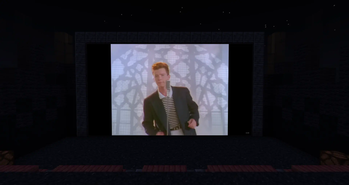

A simple modpack for watch media inside the game.

Great if you want to watch something with friends but you get bored with a simple Discord stream

And you can use emotes of your favorite Twitch streamers.

How to use:
- Place the Frame, Projector, or Television
- Press Shift+RMB to configure settings
- For added convenience, Shift+RMB while holding the "Remote Control" to control playback remotely.
- To avoid unnecessary client desync issues, wait until everyone is connected to the server and close to the screen.
- Enjoy! (A list of supported sites can be found on the WATERFrAMES page. Jellyfin stream URL is also supported.)
If you're too lazy to build everything, you can download a ready-made map from Planet Minecraft.
Quick facts
- Edition: Minecraft Java
- File type: .jar
- Minecraft version listed: 1.21.1
- How to install: Install the matching mod loader (Forge, Fabric or NeoForge) for your Minecraft version. → Download the .jar. → Put it in the .minecraft/mods folder and launch that loader profile.
- Where to get it: Opens on Modrinth — not every file is mirrored on our own servers.
Install steps are the general flow for this file type — How to install Minecraft Java mods & modpacks walks through it step by step.
File checked by MCModsHub
- Downloads as Cinema.mrpack
- Download size: 8 KB
- Download link checked 9 Oct 2026 — working
These come from our own check of the pack file, not from the source page.