
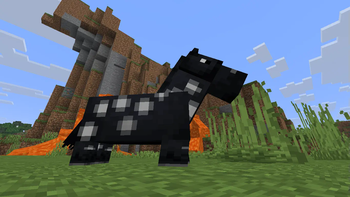
WobblyDistortion
This shader uses sin, cos and other functions to change vertices positions to make it look wobbly when you move.
May look like a fuzzy AI-generated video in some cases.
Minecraft version: 1.21.11+
Video
Config
You can configure shader in the assets/minecraft/shaders/include/distortion_config.glsl file
Config lines:
// config
#define               GAME_TIME_SCALE 5000.0 // How fast distortion of the world goes on its own
#define         DISTORTION_MULTIPLIER 0.05 // Just basic multiplier for sin() and cos()
#define     MAX_DISTORTION_MULTIPLIER 4.0 // How far can be offset vertex from original point (per axis)
#define                      COS_FREQ 1.0 // cos() frequency
#define                      SIN_FREQ 1.0 // sin() frequency
#define     DISTORTION_START_DISTANCE 0.0 // how far from camera distortion starts
#define DISTORTION_SMOOTHING_DISTANCE 5.0 // how far from camera distortion can reach its max value
Below you'll see some presets, I wanted to add compatibility with respackopts... But couldn't handle it
Quick facts
- Edition: Minecraft Java
- File type: .zip (resource pack)
- Minecraft version listed: 1.21.6-rc1
- How to install: Download the .zip resource pack — do not unzip it. → Put it in .minecraft/resourcepacks. → Enable it in Options → Resource Packs.
- Where to get it: Opens on Modrinth — not every file is mirrored on our own servers.
Install steps are the general flow for this file type — see the MC Java Mods guides for the full walkthrough.
Verified by MCModsHub
- Downloads as WobblyDistortion1.0_mc1.21.6.zip
- Download size: 55 KB
- Download link checked 25 Aug 2026 — working
These come from our own check of the pack file, not from the source page.