
✨ Описание
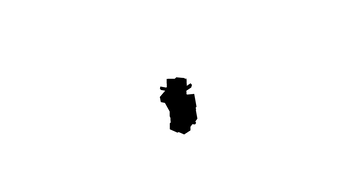
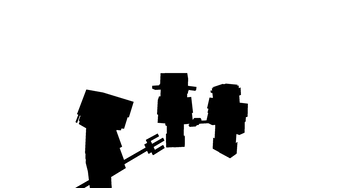
🎯 Этот шейдер упрощает процесс создания качественного хромакея, используя рендер с шейдером в качестве маски игрока вместо сложных настроек освещения и фона.
⚡ С его помощью вы сможете быстро отделить персонажа от фона без традиционной работы с зелёным экраном.
🛠 Как это работает
1️⃣ Установите данный шейдер.
2️⃣ Запишите два футажа с помощью любого мода для записи, например
🎥 ReplayMod или 📀 Flashback:
- 🎨 Один — с активным шейдером (он будет служить маской игрока).
- 🖤 Второй — без шейдера (основная картинка).
3️⃣ В программе для монтажа примените эффект Ключ маски дорожки 🖌 к основному футажу, используя запись с шейдером как маску.
4️⃣ Получите аккуратный 🎯 хромакей персонажа, готовый к дальнейшему использованию в ваших видео.
💎 Преимущества
- 🪄 Простота — не требуется настраивать освещение или подбирать фон.
- 🎯 Качество — ровная маска персонажа без артефактов.
📋 Требования
- 🔹 Любой загрузчик шейдеров (Iris или OptiFine).
- 🔹 Мод для записи футажей (рекомендовано: ReplayMod или Flashback).
- 🔹 Программа для монтажа с поддержкой эффекта
Ключ маски дорожки.
Так же в помощь мой ролик про шейдеры:
EN-English✨ Description
🎯 This shader simplifies the process of creating a high-quality chroma key, using a render with the shader as a player mask instead of complex lighting setups and backgrounds.
⚡ With it, you can quickly separate the player from the background without the traditional hassle of setting up a green screen.
🛠 How It Works
1️⃣ Install this shader.
2️⃣ Record two footages using any recording mod, for example
🎥 ReplayMod or 📀 Flashback:
- 🎨 One — with the shader enabled (this will serve as the player mask).
- 🖤 Another — without the shader (main video).
3️⃣ In your video editing software, apply the Track Matte Key 🖌 effect to the main footage, using the shader render as the mask.
4️⃣ Get a clean 🎯 player chroma key, ready to use in your videos.
💎 Benefits
- 🪄 Simplicity — no need to adjust lighting or set up a background.
- 🎯 Quality — clean player mask without artifacts.
📋 Requirements
- 🔹 Any shader loader (Iris or OptiFine).
- 🔹 A recording mod (recommended: ReplayMod or Flashback).
- 🔹 Video editing software with support for
Track Matte Key(or similar) effects.

- Edition: Minecraft Java
- File type: .zip (resource pack)
- Minecraft versions listed: 1.20, 1.20.1, 1.20.2
- How to install: Download the .zip resource pack — do not unzip it. → Put it in .minecraft/resourcepacks. → Enable it in Options → Resource Packs.
- Where to get it: Opens on Modrinth — not every file is mirrored on our own servers.
Install steps are the general flow for this file type — see the MC Java Mods guides for the full walkthrough.
- Downloads as EntityMask shader.zip
- Download size: 84 KB
- Download link checked 25 Aug 2026 — working
These come from our own check of the pack file, not from the source page.