Distant from the Horizons
Java modpack listed for Minecraft 1.21. Downloads from the MC Java Mods app on Android.
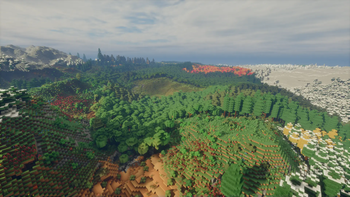
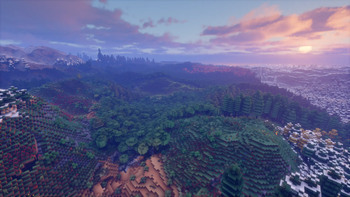
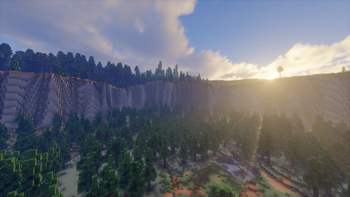
Focused around Distant Horizons, making the overworld stunning, and incentivizing exploration, while improving upon the base game's mechanics to bring a…
⬇ Download on Modrinth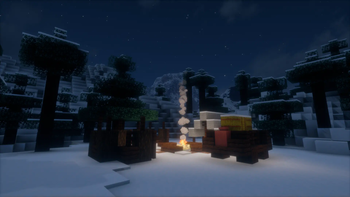
Warning: This modpack is rather heavy by default! Ensure you set the settings for Distant Horizons and Sodium to ones that work for you, and your system!
Distant from the Horizons
The primary purpose of this modpack is to overhaul the overworld's world generation to make it very cinematic and beautiful, while also improving the base game without basically turning it into a different game altogether. Please do note, this modpack, as of time of writing, does not modify the Nether or End in any way.
The current plan is to include Create, alongside some addons, once they have been updated to 1.21. This is primarily for the train system, which I can see work very well with the world generation.
Personal recommendations for usage
- Bliss's in-development version [Direct Download] (Quite heavy on performance!)
- Otherwise any other shader with support for Distant Horizons
Recommended first steps
- Open up your options, and change your graphics and Distant Horizon settings as you need.
- Set your controls. We include the Controlling mod to help with this. By default, unfortunately there are a couple of conflicts in the controls, you can specifically show those by enabling "Show Conflicts" at the bottom of the controls page, in order to sort them out.
- Upon starting a new world, we highly recommend pre-generating chunks. However, be aware that this might cause purely visual holes in the world for a while, outside of your regular render distance as Distant Horizons needs a bit to keep up with the world generation. Here's a quick guide on how to get started with pre-generation (This may require cheats to be enabled!):
/chunky spawn< Set Chunkys center to be the world spawn, this should be default, however it is always good to be more explicit./chunky radius 100c< Feel free to replace 100c with any number you would like, however 100c is a pretty good starting point. This means, a radius of 100 chunks will be pre-generated./chunky start< This will start the pre-generation process.- For more information on how to use Chunky, the included pre-generation utility, please refer to their page here.
- Please do note, increasing the "CPU Load" setting to "Balanced" or "Agressive" may help with the generation of LODs for distant chunks, thus reducing the amount of, and the time the holes in distant chunks are visible for, but please ensure your system can handle these settings.
Known issues and fixes
- Issue: My game crashes when I open the "Create New World" menu.
Fix: Simply restart the game. This is an issue that appears to not be fixable by me. This generally only happens once.
- Issue: My game crashes when I open my inventory. (Fixed in 0.1.1 and above)
Fix: Try restarting the game and waiting for a little before opening the inventory. If the issue persists, turn off or remove the mod "EMI" from the game. (A short tutorial on how to do this can be found below.) This issue is related to EMI and very flakey. Often it doesn't happen at all for multiple hours, and sometimes it happens every time. If you require a mod such as EMI, try using JEI instead. I simply prefer EMI over JEI, which is why it is the one included.
- Issue: I start with 26 levels of EXP and the "Adventuring Time" advancement
Fix: There currently is no fix for this unfortunately. If you'd like to, you can reset your EXP using
/xp set @s 0 levelsand/xp set @s 0 points. However, this does require to have commands enabled for singleplayer, or to have operator permissions on a server.
Tutorial on how to disable/remove mods from a pre-existing modpack in the Modrinth App
First and foremost, close the game.
Open the modpacks profile page, this is generally done by clicking the modpack in your library or home. The profile page consists of a list of mods in the middle with a search bar (this is important later), and the icon, name, and a "Content", "Logs", and "Options" button on the left.
Go to the options page by pressing the "Options" button on the left.
On the options page, scroll all the way to the bottom until you find a section called "Modpack" with an option called "Unlock instance". Press the "Unlock" button to the right, and confirm that you do want to unlock it after reading the warning.
Now go back to the "Content" page, search for the desired mod to disable/remove, and disable it by pressing the toggle, or remove it by pressing the trash bin to the right of it.
- Edition: Minecraft Java
- File type: .jar
- Minecraft version listed: 1.21
- How to install: Install the matching mod loader (Forge, Fabric or NeoForge) for your Minecraft version. → Download the .jar. → Put it in the .minecraft/mods folder and launch that loader profile.
- Where to get it: Opens on Modrinth — not every file is mirrored on our own servers.
Install steps are the general flow for this file type — How to install Minecraft Java mods & modpacks walks through it step by step.
- Downloads as Distant from the Horizons 0.2.0.mrpack
- Download size: 59 KB
- Download link checked 10 Oct 2026 — working
These come from our own check of the pack file, not from the source page.