
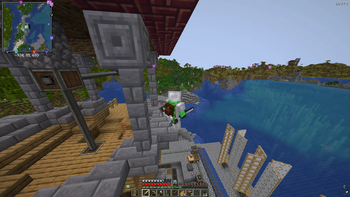
Create: Adventure Begins!
Welcome to a world where engineering meets exploration. Create: Adventure Begins! is designed to be a balanced experience that enhances the core charm of Minecraft without making it feel like a completely different game. Whether you want to build a massive automated factory, trek through overhauled dungeons, or simply enjoy a more vibrant world, this pack is built to provide a stable and immersive journey.
Features
- Mechanical Mastery: Build intricate moving contraptions and automated systems using the Create mod. This version expands your engineering toolkit with The Factory Must Grow, Dreams n' Desires, and Power Loader.
- A Living World: Encounter a massive variety of wildlife with Alex's Mobs. Explore beautifully enhanced biomes from Geophilic.
- Total Dungeon Overhaul: Discover completely redesigned caves, mineshafts, and strongholds thanks to the full YUNG’s Better series and Explorify.
- Homesteading & Storage: Master the culinary arts with Farmer’s Delight and Ratatouille. Keep your items organized with Sophisticated Backpacks, Tom’s Simple Storage, and Lootr.
- The Stars Above: Journey beyond the world with the Northstar Redux space expansion.
- Atmospheric Detail: Experience the world through AmbientSounds, Presence Footsteps, and Sound Physics Remastered.
Performance First
This pack is built on a high-performance foundation. By utilizing Sodium, Lithium, Ferrite Core, and ModernFix, we ensure the game runs as smoothly as possible even with complex machinery.
PC Specification Settings (Recommended)
Low-End PCs (Integrated Graphics / 4GB RAM)- Video Settings: Set Render Distance to 6-8 chunks.
- Graphics: Set to 'Fast'.
- Clouds: Set to 'Fast' or 'Off'.
- Shaders: Keep disabled for best performance.
- Resource Packs: Disable "Stay True" to save memory.
- Video Settings: Set Render Distance to 10-12 chunks.
- Graphics: Set to 'Fancy'.
- Shaders: Complementary or BSL (Medium settings).
- Resource Packs: All enabled.
- Video Settings: Set Render Distance to 16+ chunks.
- Graphics: Set to 'Fabulous!'.
- Shaders: Bliss or Photon (Ultra settings).
- Resource Packs: All enabled.
Setup & Launch Guide
How to Launch- Download the pack via the Modrinth App.
- Ensure you have allocated at least 4GB to 6GB of RAM in the profile settings.
- Hit Play and wait for the Seamless Loading Screen to finish.
The pack includes Iris for shader support. To use them:
- Go to Options > Video Settings > Shader Packs.
- Select your preferred shader from the list:
- Bliss: For a realistic, atmospheric look.
- BSL: The classic, high-performance standard.
- Complementary: A perfect balance of visuals and performance.
- Photon: Lightweight and modern.
To enable the custom look of the pack, go to Options > Resource Packs and move these to the right side:
- Fresh Animations: (Classic horses, Creepers, Details, Emissive, Objects, and Quivers).
- Lower utilities and eating animations: For a cleaner first-person view.
- Mandala's GUI: For a polished, themed interface.
- Stay True: For enhanced vanilla-style textures.
- Edition: Minecraft Java
- File type: .jar
- Minecraft version listed: 1.21.1
- How to install: Install the matching mod loader (Forge, Fabric or NeoForge) for your Minecraft version. → Download the .jar. → Put it in the .minecraft/mods folder and launch that loader profile.
- Where to get it: Opens on Modrinth — not every file is mirrored on our own servers.
Install steps are the general flow for this file type — How to install Minecraft Java mods & modpacks walks through it step by step.
- Downloads as Create- Adventure Begins!.mrpack
- Download size: 13.0 MB
- Download link checked 1 Sept 2026 — working
These come from our own check of the pack file, not from the source page.