
Smoothly Optimized
A lightweight PvP-focused optimization modpack designed to boost FPS, reduce lag, and deliver smooth performance on lower-end PCs.
⬇ Download on Modrinth
⚡ Smoothly Optimized 4.0
DISCONTINUED
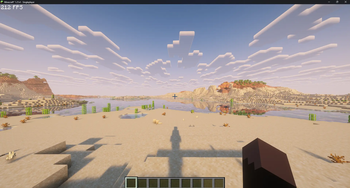
Maximum FPS. Pure PvP Performance. Built for 1.21 & 1.21.4.
Smoothly Optimized (SmoothOpt) is a lightweight PvP and performance-focused modpack designed to deliver smooth, stable, and highly responsive gameplay — even on low-end PCs.
Version 4.0 is fully refined for competitive players. It includes only essential FPS optimization mods and useful PvP utilities. No unnecessary features. No visual clutter. No performance-heavy extras. Every mod has been carefully selected and tested for stability, compatibility, and maximum efficiency in competitive environments.
🚀 Features
Significantly improved and stable FPS
Reduced frame drops and micro-stutters
Lower input latency for faster reactions
Clean, distraction-free interface
Lightweight and optimized setup
⚠️ Known Issue – Lunar Client
There is currently a visual hotbar glitch when using Lunar Client where it may disappear and reappear. A fix is being researched. For now, Lunar Client is not recommended.
📦 Client Compatibility
For best compatibility, use: Modrinth Launcher
📌 Extra Info
Some PvP resource packs are included. A few are made by me (such as PaleOverlayV3 and PaleOverlayV4), while others are created by different pack makers.
If needed, you can convert the .mrpack file here: https://jamie.codeberg.page/mrpack-to-zip/@master/
- Edition: Minecraft Java
- File type: .jar
- Minecraft version listed: 1.21
- How to install: Install the matching mod loader (Forge, Fabric or NeoForge) for your Minecraft version. → Download the .jar. → Put it in the .minecraft/mods folder and launch that loader profile.
- Where to get it: Opens on Modrinth — not every file is mirrored on our own servers.
Install steps are the general flow for this file type — How to install Minecraft Java mods & modpacks walks through it step by step.
- Downloads as Smoothly Optimized 4.0.0.mrpack
- Download size: 85.8 MB
- Download link checked 3 Sept 2026 — working
These come from our own check of the pack file, not from the source page.