
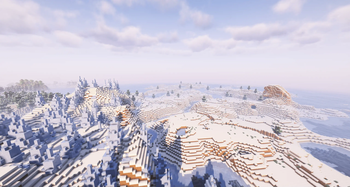
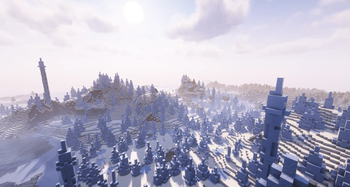


Description of Minecraft Modpack: Re: Optimized
Welcome to Re: Optimized, a modpack for Minecraft designed for players who want to maximize their enjoyment with enhanced performance and graphics quality. This pack includes numerous useful mods that optimize your gameplay experience and add new features without overloading your system.
Key Mods:
- Sodium + Sodium Extra: Significantly improves game performance by reducing CPU and GPU load.
- Iris: Enables the use of shaders, creating stunningly beautiful landscapes.
- Lithium: Further optimizes the world, making it more responsive and faster.
- Entity Culling: Reduces rendering of objects outside your field of view, increasing FPS.
- Dynamic FPS: Automatically lowers frame rates when inactive to save energy.
- Mod Menu: A convenient interface for managing all installed mods.
Interface Enhancements:
- BetterPingDisplay: Displays player ping next to their usernames.
- Inventory Profiles Next: Adds advanced inventory management features.
- Xaeros Minimap & World Map: Reliable minimap and world map with extensive customization options.
- Zoomify: Allows you to zoom in on the camera for better visibility.
Graphics Quality:
- BetterGrassify: Improves grass textures, making them more realistic.
- Continuity: Adds smooth transitions between biomes.
- Entity Texture Features: Expands texture capabilities for mobs and items.
- ModelFix: Fixes issues with block and item models.
Useful Tools:
- CalcMod: An in-game calculator for quick computations.
- MoreChatHistory: Saves chat history for easy review.
- NoChatReports: Blocks chat-based error reports from being sent.
- ModernFix: Addresses numerous performance and stability issues.
Additional Features:
- BlockMeter: Measures distances between blocks.
- ImmediatelyFast: Speeds up world and texture loading.
- PaginatedAdvancements: Organizes advancements into convenient pages.
This pack is perfect for both everyday gameplay and content creation, offering high performance and excellent graphics quality. Download Re: Optimized and enjoy Minecraft like never before!
Search Keywords:
Minecraft, Fabric, modpack, mods, performance, graphics, optimization, interface, calculator, maps, chat, textures, biomes, fps, ping, inventory, shaders, sodium, iris, lithium, entity culling, dynamic fps, mod menu, xaeros, zoomify, bettergrassify, continuity, entity texture features, blockmeter, immediatelyfast, paginatedadvancements, morechathistory, noreports, modernfix, calcmod.
- Edition: Minecraft Java
- File type: .jar
- Minecraft version listed: 1.21.4
- How to install: Install the matching mod loader (Forge, Fabric or NeoForge) for your Minecraft version. → Download the .jar. → Put it in the .minecraft/mods folder and launch that loader profile.
- Where to get it: Opens on Modrinth — not every file is mirrored on our own servers.
Install steps are the general flow for this file type — How to install Minecraft Java mods & modpacks walks through it step by step.
- Downloads as Re Optimized 1.0.2.mrpack
- Download size: 9 KB
- Download link checked 5 Sept 2026 — working
These come from our own check of the pack file, not from the source page.