
Introduction
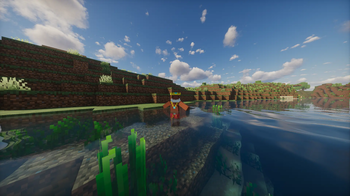
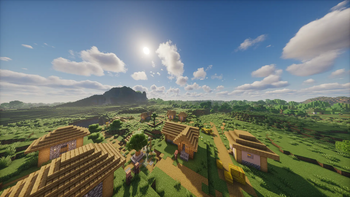
A broad horizon is not enough. We hope it will be full of life. The modpack was created to quench the thirst.
This mode doesn't offer any convenience, it stays vanilla intact and has only visual enhancements.
Optimization has improved a lot compared to the past, and there have been a number of overlapping features. This modpack will provide maximum effect with minimal mode so that each other's functionality doesn't invade.
This modpack will always be aimed at the latest version of Minecraft and will follow. This will ensure that the world we've worked so hard on is not abandoned despite frequent official updates, and will ensure it's sustainable.
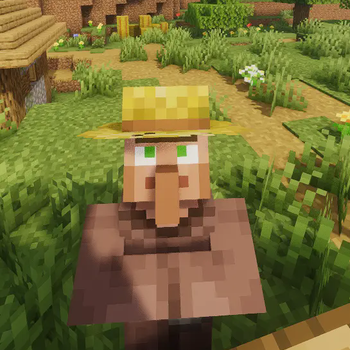
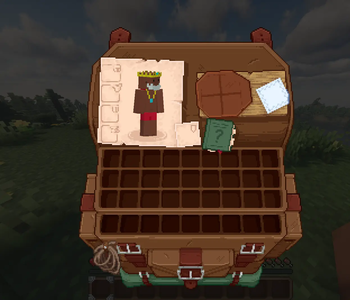
Preview Content
Main mods
- Distant Horizons: https://modrinth.com/mod/distanthorizons
Immersive Mods
- Immersive UI: https://modrinth.com/mod/immersive-ui
- Cool Rain: https://modrinth.com/mod/coolrain
- Particle Rain: https://modrinth.com/mod/particle-rain
- Hold My Items: https://modrinth.com/mod/hold-my-items
- Subtle Effects: https://modrinth.com/mod/subtle-effects
- Particle Effects: https://modrinth.com/mod/particle-effects
- Dynamic Crosshair: https://modrinth.com/mod/dynamiccrosshair
included resource packs
- Fresh animation: https://modrinth.com/resourcepack/fresh-animations
- Detailed animations: https://modrinth.com/resourcepack/detailed-animations
- Shrimp's Immersive Interfaces: https://modrinth.com/resourcepack/shrimps-immersive-interfaces
included shader packs
- Complementary Shaders - Unbound: https://modrinth.com/shader/complementary-unbound
(It's the best fit )
- Photon shader: https://modrinth.com/shader/photon-shader
( It's generally perfect, but there can be some errors in the vast underground cave )
Requirements ( JAVA 21 )
8GB - This is the optimum amount of RAM for Distant Horizons. with something resourcepacks
*10GB or more can cause performance degradation. Choose only when applying vast terrain generation modes or large content modes
Discord: https://discord.gg/wNg4HB4Z
- Edition: Minecraft Java
- File type: .jar
- Minecraft version listed: 1.21.11
- How to install: Install the matching mod loader (Forge, Fabric or NeoForge) for your Minecraft version. → Download the .jar. → Put it in the .minecraft/mods folder and launch that loader profile.
- Where to get it: Opens on Modrinth — not every file is mirrored on our own servers.
Install steps are the general flow for this file type — How to install Minecraft Java mods & modpacks walks through it step by step.
- Downloads as Fresh Fancy Horizon.mrpack
- Download size: 47 KB
- Download link checked 5 Sept 2026 — working
These come from our own check of the pack file, not from the source page.