
Simple Discord Rich Presence (Forge / Fabric)
Java mod listed for Minecraft 1.16–1.21. File opened and checked on 27 Sep 2026; downloads from the MC Java Mods app on Android.
I don't know my version or loader


What is SDRP?
SDRP is a simple Discord Rich Presence client for Minecraft that allows you to display your current Minecraft status on Discord.
How do I use SDRP?
- Simply download the mod from CurseForge and put it in your mods folder. This is a client-side only mod so you don't need to install it on your server.
- You will then need to create an application on Discord. You can do this by going to the Discord Developer Portal and clicking "New Application". Give it a name and click "Create".
- Attach an image to your app on the
General Informationtab. This will be the image that is displayed on Discord when the status is not playing Minecraft. - Go to the
Rich Presencetab and add a new image. This will be the image that is displayed on Discord when the status is playing Minecraft.
- Attach an image to your app on the
- Once you have made your application, you will need to attach images with the correct names for the mod to work.
- We've attached example images in the
imagesfolder. These have the correct names for the mod to work out of the box. - A correct configuration will look like this:
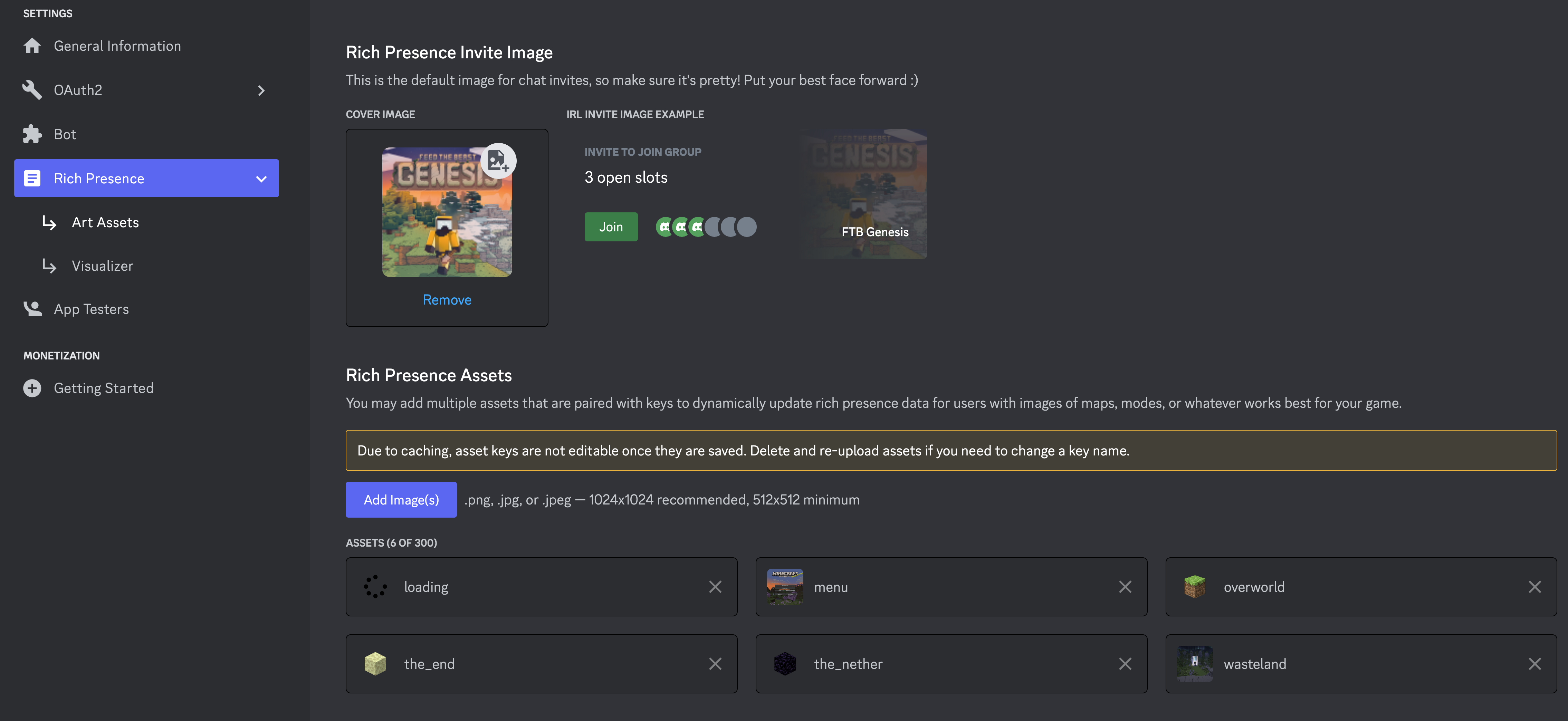
- If you want to setup your own images, you can follow the next section.
- We've attached example images in the
Caveats
We always will attempt to use an image called loading and an image called menu for when the game is loading or is on the main menu respectively. If you do not have these images, the mod will simply fail to display an image for these states.
menuWhen the main menu is showingloadingWhen the game is loading
Using custom images
If you are not using the KubeJS integration then you will need to follow the our convention for naming images and language keys. The convention is as follows:
- Name:
sdrp.[DIMENSION_NAME](Language key) - Image Key:
sdrp.[DIMENSION_NAME].in - Image Name:
[DIMESNION_NAME]
So for this to work, you'd need to have an image added to your Discord apps rich presents settings under the name of the dimension you want to support.
If I wanted to support the end and the overworld for example. Their names are as follows minecraft:overworld, minecraft:the_end. We ignore the minecraft: part and name the images the_end and overworld. We then add a language key to the language Json for both the Image Key and Name:
{
  "sdrp.overworld": "Overworld",
  "sdrp.overworld.in": "In the Overworld"
}
What we support out of the box
Dimensions
We omit the modid from the dimension name and use the name instead. So minecraft:overworld becomes overworld.
overworldthe_netherthe_endcompact_worlddungeonspatial_storageothersideparadise_lostmining
Not all of these dimensions have example images with-in the images folder
Languages
{
  "sdrp.logo": "Pack Logo",
  "sdrp.mainmenu": "Main Menu",
  "sdrp.overworld.in": "In Overworld",
  "sdrp.overworld": "Overworld",
  "sdrp.the_nether.in": "In Nether",
  "sdrp.the_nether": "Nether",
  "sdrp.the_end.in": "In The End",
  "sdrp.the_end": "The End",
  "sdrp.compact_world.in": "In Compact World",
  "sdrp.compact_world": "Compact World",
  "sdrp.dungeon.in": "In Dungeon World",
  "sdrp.dungeon": "Dungeon World",
  "sdrp.spatial_storage.in": "In Spatial Storage",
  "sdrp.spatial_storage": "Spatial Storage",
  "sdrp.otherside.in": "In Otherside",
  "sdrp.otherside": "Otherside",
  "sdrp.paradise_lost.in": "In Paradise Lost",
  "sdrp.paradise_lost": "Paradise Lost",
  "sdrp.mining": "Mining Dimension",
  "sdrp.mining.in": "In Mining dimension"
}
Config
{
  "clientId": 1000000000,   // Your Discord application ID
  "enabled": true,          // Whether or not the mod is enabled
  "screenEvent": false,     // Disables the `menu` and `loading` images
  "clientJoinEvent": false, // Disables the level join events which will prevent the mod from showing the level you are in
  "logState": false,        // Enables developer logging of the state json being sent to Discord
}
- Edition: Minecraft Java
- File type: .jar
- Minecraft versions listed: 1.21.11, 1.21.8, 1.21.5
- How to install: Install the matching mod loader (Forge, Fabric or NeoForge) for your Minecraft version. → Download the .jar. → Put it in the .minecraft/mods folder and launch that loader profile.
- Where to get it: Opens on CurseForge — not every file is mirrored on our own servers.
Install steps are the general flow for this file type — How to install Minecraft Java mods & modpacks walks through it step by step.
- Ships as SimpleDiscordRichPresence-1.6.0-build.8+mc1.18.1.jar — drop this file into the mods folder
- Download size: 121 KB
- Download link checked 25 Oct 2026 — working
These come from our own check of the pack file, not from the source page.


