
ChunkPilot
Java modpack listed for Minecraft 26.x. Downloads from the MC Java Mods app on Android.
Client-side Fabric performance pack with conservative defaults, optional vanilla-style visuals, and technical survival tools.
⬇ Download on Modrinth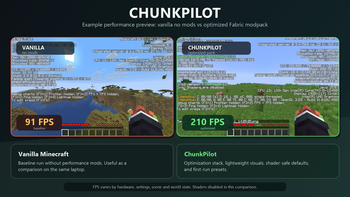
ChunkPilot
ChunkPilot is a Fabric client modpack for Minecraft 26.1.2. It bundles performance, rendering, memory, and culling mods with conservative default settings, optional vanilla-style visuals, and technical-survival client tools.
The goal is to provide a ready-to-import client setup for players who want a smoother baseline than vanilla on common hardware, especially laptops and integrated graphics. Performance results vary by device, graphics drivers, world, settings, server, render distance, enabled resource packs, and shaders.
What Is Included
- Fabric Loader 0.19.2 and Minecraft 26.1.2.
- Performance and rendering mods such as Sodium, Lithium, FerriteCore, Entity Culling, More Culling, ImmediatelyFast, ScalableLux, BadOptimizations, Better Block Entities, Ksyxis, FastQuit, Dynamic FPS, Krypton, and related dependencies.
- Iris for optional shader support. Shaders are disabled by default.
- MakeUp Ultra Fast as an optional lightweight shader pack.
- Vanilla-style resource packs. The default enabled packs are Vanilla Experience Plus, Visible Ores, and Visual Armor Trims. Other included packs are optional and can be enabled or disabled by the player.
- Technical-survival tools: Litematica, MiniHUD, Tweakeroo, Item Scroller, Shulker Box Tooltip, Xaero Minimap, and Xaero World Map.
ChunkPilot AutoTune
ChunkPilot includes a small client-side helper called ChunkPilot AutoTune. On first launch, it writes a conservative Minecraft settings preset using available information such as CPU thread count, memory values, operating system, and GPU name hints when available.
AutoTune is meant to choose safer starting settings. It does not modify graphics drivers, overclock hardware, change Windows settings, or guarantee a specific FPS number. By default, it does not overwrite player changes every launch.
Default first-run settings include:
- Render distance: 8 chunks.
- Simulation distance: 6 chunks.
- FPS cap: 120.
- Shaders disabled.
- Lightweight resource packs enabled.
Environment And Compatibility
ChunkPilot is a client-side modpack. Install it on your Minecraft client through Modrinth App, Prism Launcher, or another launcher that supports .mrpack files.
It is not intended to be installed on a dedicated server. It should be able to join vanilla or Fabric servers when those servers allow client-side performance, minimap, and technical utility mods. Always follow the rules of the server you play on.
What ChunkPilot Does Not Do
- It does not add new blocks, items, mobs, dimensions, quests, or progression systems.
- It does not include ReShaded because of compatibility warnings and FPS impact in this setup.
- It does not include Technical Tree Chopper in the public default pack because that changes survival gameplay.
- It does not promise the same FPS result on all hardware.
Recommended Use
Start with the default settings. If your computer has a dedicated GPU, you can try enabling MakeUp Ultra Fast manually through Iris. If your FPS drops too much, turn shaders off again and reduce render distance.
- Edition: Minecraft Java
- File type: .jar
- Minecraft version listed: 26.1.2
- How to install: Install the matching mod loader (Forge, Fabric or NeoForge) for your Minecraft version. → Download the .jar. → Put it in the .minecraft/mods folder and launch that loader profile.
- Where to get it: Opens on Modrinth — not every file is mirrored on our own servers.
Install steps are the general flow for this file type — How to install Minecraft Java mods & modpacks walks through it step by step.
- Downloads as ChunkPilot-26.1.2.mrpack
- Download size: 26 KB
- Download link checked 22 Oct 2026 — working
These come from our own check of the pack file, not from the source page.