
⚙️ OPTI CREATE!
🛠️ Create Mod add-ons included:
- Create Aeronautics
- Create Jetpack
- Create More Automation
- Create More Conveyor
- Create More: Vertical Belts
- Create: Bits ‘n’ Bobs
- Create: Connected
- Create: Copper & Zinc
- Create: Diesel Generators
- Create Enchantable Machinery
- Create: Liquid Fuel
- Create: Ultimate Factory
- Create Better FPS
📈 Optimization Results (On Older PCs)
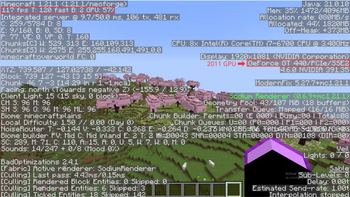
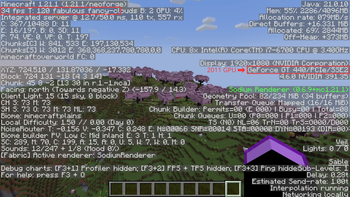
The results of the modpack optimization are incredible. Here you can see the actual comparison running on a 2011 graphics card:
❌ Before Optimization (Minecraft With Create and addons)
40-50 FPS (GPU: GT440)
🟢 After Optimization (Opti Create)
100-120 FPS (GPU: GT440)
⚠️ Important Notices
> 📌 Notice 1
This is the first version of the modpack; all positive feedback is welcome!
> 📌 Notice 2
If the arms don’t load when you start a world, press F11. That will fix the problem!
> 📌 Notice 3
Go to the Video Settings section, then Fps Reducer, and under Performance, change Chunks Update Threads to match your processor’s threads to improve performance.
- Edition: Minecraft Java
- File type: .jar
- Minecraft version listed: 1.21.1
- How to install: Install the matching mod loader (Forge, Fabric or NeoForge) for your Minecraft version. → Download the .jar. → Put it in the .minecraft/mods folder and launch that loader profile.
- Where to get it: Opens on Modrinth — not every file is mirrored on our own servers.
Install steps are the general flow for this file type — How to install Minecraft Java mods & modpacks walks through it step by step.
- Downloads as OptiCreate 1.0.0.mrpack
- Download size: 96 KB
- Download link checked 23 Aug 2026 — working
These come from our own check of the pack file, not from the source page.