
Chill & Play!
Java modpack listed for Minecraft 1.21. Downloads from the MC Java Mods app on Android.
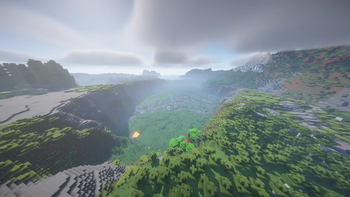
Chill & Play is a new minecraft modpack, focusing around new and vanilla + content, improvements, stunning world gen, and amazing visuals with good…
⬇ Download on Modrinth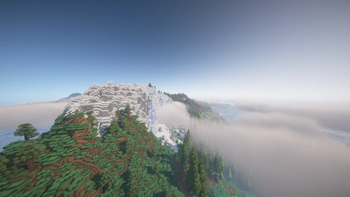

Chill & Play
A carefully curated vanilla+ Fabric modpack (1.21.1) focused on relaxing gameplay, immersive visuals, and meaningful content expansion—without overwhelming the core Minecraft feel.
What is this modpack?
Chill & Play enhances Minecraft by blending performance, atmosphere, and exploration into one smooth experience. It keeps the game recognizable while upgrading almost every aspect—from world generation to sound design.
Whether you're building, exploring, or just vibing, this pack is made to feel cozy, alive, and modern.
Visual Overhaul
Shader support via Iris + Sodium Realistic lighting, shadows, and sky atmosphere Enhanced models, textures, and animations Falling leaves, better particles, and environmental details
Immersion & Audio
Dynamic ambient sounds Improved sound physics More realistic movement and environment feedback
Performance & Optimization
Powered by Sodium, Lithium, FerriteCore, and more Smooth gameplay even with heavy visuals Optimized for stability and fast loading
Quality of Life
Better UI, tooltips, and inventory management Waystones for fast travel Mouse tweaks, zoom, and usability improvements Enhanced third-person camera
Vanilla+ Content Expansion
New blocks and decorative options Farming and food improvements Backpacks and storage upgrades Subtle additions that fit naturally into Minecraft
Technical Info
Minecraft Version: 1.21.1 Mod Loader: Fabric Focus: Vanilla+, Performance, Visuals, Exploration
⚠️ Notes Shaders are optional but highly recommended Works best with a mid-range PC or better Some world generation mods require a new world
Bug Reports
If you encounter issues, report them here: https://github.com/Jeagrr/Chill-Play/issues
- Edition: Minecraft Java
- File type: .jar
- Minecraft version listed: 1.21.1
- How to install: Install the matching mod loader (Forge, Fabric or NeoForge) for your Minecraft version. → Download the .jar. → Put it in the .minecraft/mods folder and launch that loader profile.
- Where to get it: Opens on Modrinth — not every file is mirrored on our own servers.
Install steps are the general flow for this file type — How to install Minecraft Java mods & modpacks walks through it step by step.
- Downloads as Chill & Play! 1.0.1.mrpack
- Download size: 2.5 MB
- Download link checked 24 Oct 2026 — working
These come from our own check of the pack file, not from the source page.