

While other modpacks focus on pure performance, OPT offers stability and an almost stutter-free experience.
OPT doesn't limit itself to using the most famous mods. One of the main difficulties of this project was finding the truly important mods that actually make a difference in performance, without overloading the pack.

info: 12 chunks S / 12 chunks R 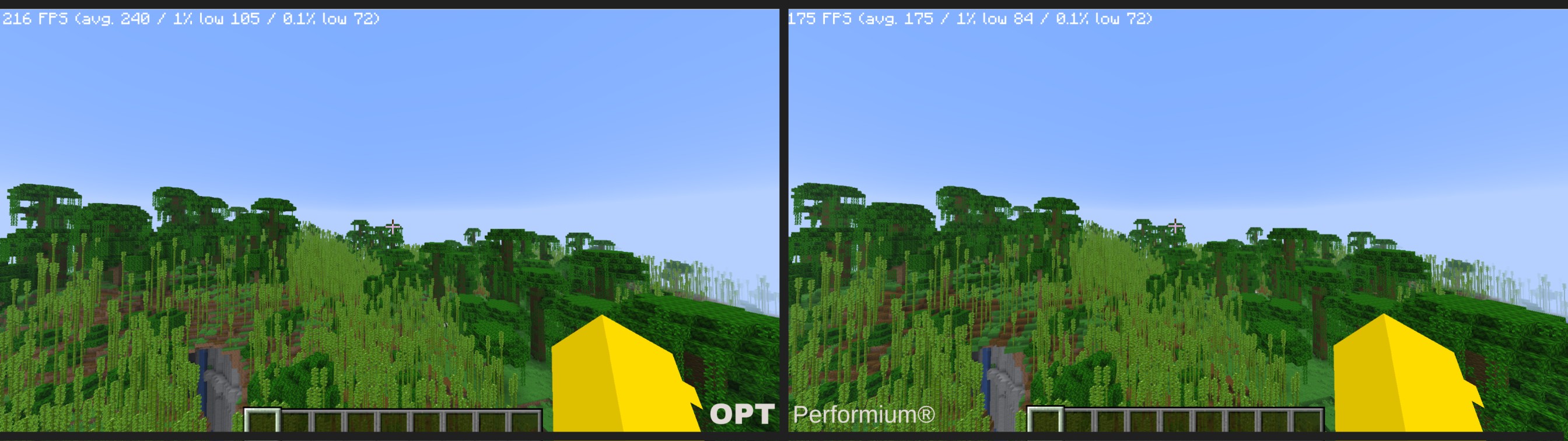 (the rest are the default configs of both)
- OPT (left side): 216 FPS
- Performium (right side): 175 FPS
- Tested looking at the same point and from the same position in both
- Here we can notice that the modpacks react the same way to motionless testing, both performing very well.
Now a chunk loading test:
everything was recorded under the same conditions
OPT

Performium

I didn't record the whole screen because it was drastically impacting the framerate, I'm sorry
- As you can see, that's the problem. The game starts to stutter as soon as you enter unloaded chunks, and it's not only a problem with Performium — it happens in almost every optimization modpack. OPT aims to mitigate this problem (as seen in the demonstration) and does so by using mods that fix most of the underlying clutter that causes it.

This was never supposed to be a published modpack. I was simply trying to optimize Minecraft, because every other modpack I tried had the same problems mentioned.
As I was working on this project, I noticed the rise of performance mods in the Minecraft community, many of which fix issues that no other mods do. These mods were real lifesavers for the project. I recommend checking out each one for more detailed descriptions.
All of the mods present here were handpicked to push Minecraft to the best of its capacity. I didn't just add what I thought was good — I tested every combination until I reached the final version.
It's worth remembering that most (if not all) of the mods can be updated to the latest version.
- Edition: Minecraft Java
- File type: .jar
- Minecraft version listed: 26.1
- How to install: Install the matching mod loader (Forge, Fabric or NeoForge) for your Minecraft version. → Download the .jar. → Put it in the .minecraft/mods folder and launch that loader profile.
- Where to get it: Opens on Modrinth — not every file is mirrored on our own servers.
Install steps are the general flow for this file type — How to install Minecraft Java mods & modpacks walks through it step by step.
- Downloads as OPTpack 1.0.0.mrpack
- Download size: 14 KB
- Download link checked 24 Aug 2026 — working
These come from our own check of the pack file, not from the source page.