Fast Item Frames
Java mod listed for Minecraft 1.20–1.21. Downloads from the MC Java Mods app on Android.
I don't know my version or loader









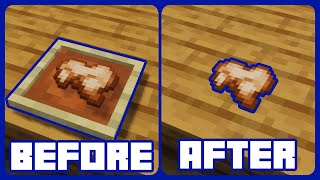
Fast Item Frames completely redesigns item frames to make them faster, more responsive, and more useful than ever before. 🚀
Instead of relying on entities, item frames become lightweight blocks that perform significantly better, especially in builds containing large numbers of frames. They react instantly to world changes, support proper block interactions, and include several quality of life improvements that vanilla item frames are missing. ⚡
Beyond performance, this mod adds powerful customization options. Dye frames in millions of colors 🎨, hide the frame itself to showcase only the item 🫥, wax frames to prevent accidental changes 🍯, and fine tune the appearance of invisible frames to perfectly fit your builds and resource packs. ✨

- 🧱 Block-Based Item Frames: Item frames are implemented as blocks instead of entities for greatly improved performance.
- 🚀 Less Lag, More FPS: Rendering and updates are much faster, giving FPS boosts in areas with many frames.
- 💥 Better Interactions: Includes proper breaking particles and full compatibility with commands like
/setblock. - ⚡ Instant Reactions: Frames immediately respond when their supporting block is broken or moved by pistons.
- ✅ Multiple Frames Per Block: Still supports multiple item frames occupying the same block space.
- 🎨 Millions of Colors: Dye item frames just like leather armor to unlock 5,713,438 unique colors.
- 🫥 Invisible Frames: Shift + right-click with an empty hand to hide the frame itself while displaying the item larger than usual.
- 🍯 Waxed Item Frames: Use honeycomb to lock item frames and prevent accidental rotation, modification, or visibility changes.
- 🏷️ Optional Name Tag Hiding: Prevent custom item names from appearing while looking at displayed items.
- 🔄 World Conversion Options: Optionally convert existing vanilla item frame entities into item frame blocks upon loading chunks.



⏩ INSTALLATION REQUIRED ON CLIENT & REQUIRED ON SERVER
⏩ REQUIRES PUZZLES LIB TO BE INSTALLED (FABRIC & NEOFORGE)
⏩ REQUIRES FABRIC API TO BE INSTALLED (FABRIC)
⏩ REQUIRES FORGE CONFIG API PORT TO BE INSTALLED (FABRIC)

If available for a mod, configuration is possible directly from in-game using the mod menu (requires Mod Menu by Prospector to be installed on Fabric).
For manual configuration using an external text editor all files are found at .minecraft/config, named as MOD_ID-client.toml, MOD_ID-common.toml, or MOD_ID-server.toml, depending on the type of config. Not all types might exist for a mod, if any at all.

🌟 Thanks to MehVahdJukaar for inspiring this project with their Fast Paintings mod.
 |
 |
|
 |
 |
|
 |
 |
|
 |
 |
|
 |
 |
|

© 2026 @heyitsfuzs. All rights reserved. This page was last edited on 11 September 2026, at 06:44 (UTC).
- Edition: Minecraft Java
- File type: .jar
- Minecraft versions listed: 1.21.11, 1.21.10, 1.21.9
- How to install: Install the matching mod loader (Forge, Fabric or NeoForge) for your Minecraft version. → Download the .jar. → Put it in the .minecraft/mods folder and launch that loader profile.
- Where to get it: Opens on CurseForge — not every file is mirrored on our own servers.
Install steps are the general flow for this file type — How to install Minecraft Java mods & modpacks walks through it step by step.
- Ships as FastItemFrames-v20.1.5-1.20.1-Forge.jar — drop this file into the mods folder
- Download size: 97 KB
- Download link checked 24 Oct 2026 — working
These come from our own check of the pack file, not from the source page.