
Intensive Optimization
Intensive Optimization boosts FPS using mods like Sodium, Lithium, Starlight, FerriteCore, ModernFix, ImmediatelyFast, C2ME, VMP, More Culling, and…
⬇ Download on Modrinth
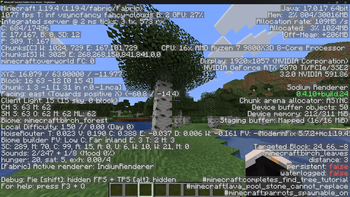
The Intensive Optimization modpack focuses on pushing Minecraft 1.19.4 to its highest possible framerate by combining a carefully selected set of performance‑oriented mods that overhaul rendering, simulation, memory usage, and GPU workload. It uses Sodium, Lithium, and Starlight as the core trio for faster rendering, physics, and lighting; FerriteCore, ModernFix, and LazyDFU to reduce memory pressure and smooth out garbage collection; ImmediatelyFast, FastAnim, Enhanced Block Entities, and More Culling to cut down draw calls and simplify what the GPU has to render; and C2ME, VMP, and Let Me Despawn to improve chunk loading, entity ticking, and world simulation. Additional refinements like_ Exordium, FastQuit, Krypton, and GPUBooster_ help reduce overhead in menus, networking, and overlays. Right now, the modpack is available only for Minecraft 1.19.4, since many of these optimizations are version‑sensitive and require careful compatibility testing. Support for newer versions is planned, but not ready yet. Users who want to add Iris or Nvidium should do so cautiously, as shader engines and experimental renderers may conflict with the pack’s optimizations and are not officially supported. For even higher FPS, players can experiment with increasing RAM allocation (within reasonable limits) and trying different** Java arguments** from trusted optimization communities to find the best setup for your hardware.
- Edition: Minecraft Java
- File type: .jar
- Minecraft version listed: 1.19.4
- How to install: Install the matching mod loader (Forge, Fabric or NeoForge) for your Minecraft version. → Download the .jar. → Put it in the .minecraft/mods folder and launch that loader profile.
- Where to get it: Opens on Modrinth — not every file is mirrored on our own servers.
Install steps are the general flow for this file type — How to install Minecraft Java mods & modpacks walks through it step by step.
- Downloads as Intensive Optimization 1.4.22.mrpack
- Download size: 35 KB
- Download link checked 7 Sept 2026 — working
These come from our own check of the pack file, not from the source page.