
Welcome to reViva!
reViva aims to recreate Minecraft Pocket Edition 1.1 inside of Minecraft Java 1.20.1, in look, feel, features, and mechanics.
▶️ Watch the trailer! (Click Me!) ▶️
reViva stays faithful to Pocket Edition in many aspects. It is a recreation of MCPE, but it's not a continuation, meaning that the feature set inside the game is also reverted to the old.
If Modrinth App gives you an error, install the MRPACK manually via the Modrinth website and import it into Modrinth. If you're still experiencing issues, use Prism Launcher I will be attempting to fix this bug in the next update ASAP.
reViva changes the game in many ways, with great attention to detail:

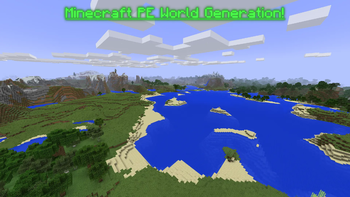
- Worlds will generate similarly to how they do in Minecraft PE
- Caves will no longer generate with biomes or deepslate (they will still go down to Y = -64, but the MCPE cave generation is used).
- Grass blends between biomes smoothly like in Pocket
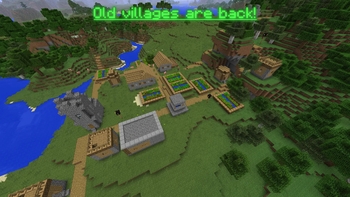
- Biomes and villages are brought back to their old state.
- Structures not present in MCPE 1.1 have been removed.
- Oceans are completely reverted to their pre-Aquatic Update state.
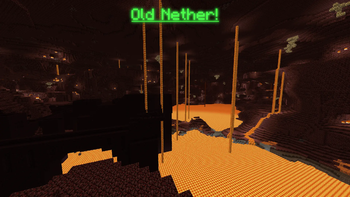
- The Nether is reverted to the one before the Nether Update.

- All blocks and items in the game have been reverted to those accessible in MCPE 1.1
- The combat has been reverted to the old Java 1.8 system (except for sword blocking and fishing rods)
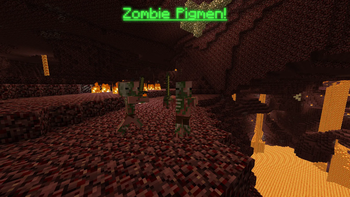
- Zombie Pigmen have been brought back
- Quasi connectivity is removed
- Tile entities can now be pushed by pistons
- The Wither fight now resembles the one from MCPE
- Enchanted golden apples can be crafted again, with 8 gold blocks around an apple.
- The fishing loot is reverted to the old loot pool
- Item frames are now blocks instead of entities
- Bedrock bridging is now in the game
- The stonecutter is back in the game, and has the modern-day functionality.
- Carved pumpkins replace pumpkins and can be used to craft pumpkin seeds.
- Use color codes when typing in signs via a GUI
- The swimming mechanics are reverted to pre-Aquatic Update
- The MCPE mushroom stem is in the game (Creative mode only)
- Distant Horizons has been added to simulate MCPE's stunning render distances
- Choose your skin (client side only) via the Quick Skin mod
- Villager trading has been disabled (This is only until I find a system that matches MCPE well! It will be brought back when I find one.)

- When hovering over a block in the world, the block gets highlighted like in MCPE
- All textures have been reverted to Programmer Art
- Wool textures and shulker box textures have been reverted to the old colors
- Beds now have 2D icons instead of showing the 3D item
- Creeper/Zombie/Skeleton/Wither Skeleton/Dragon heads now have the 2D item icons from MCPE (player heads were not edited for ease of use with custom heads)
- The Sponge and Wet Sponge are reverted to their old texture
- Dropped items now render in 2D
- Water now is more similar to MCPE's opacity
- Spawn eggs now have their MCPE names of Spawn [Entity]
- Carved Pumpkin is renamed to Pumpkin, Dirt Path is renamed to Grass Path, and Enchanting Table is renamed to Enchantment Table
- Shulker spawn egg has been reverted to MCPE 1.0
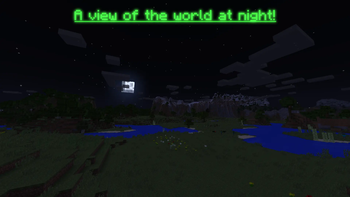
- Lighting matches MCPE more closely
- The glass/glowstone/sea lantern/redstone lamp placing sounds are reverted to the MCPE sound
- The netherrack and nether bricks sounds are reverted to the MCPE sounds
- The water splash sound is reverted to the old
- The sounds for doors, trapdoors, fence gates and chests have also been reverted
- Lava is reverted back to the old texture from MCPE
- Piston arms are from MCPE
- Jungle leaves are opaque
- MCPE splash texts have been brought back

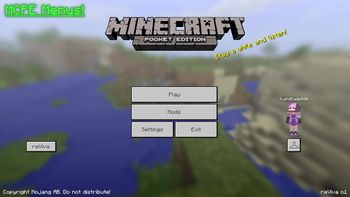
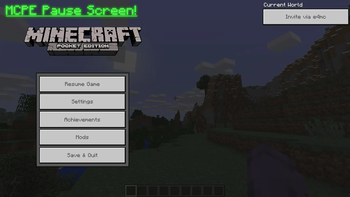
Several menus feature MCPE-like interfaces, such as:
- Menu screen
- Pause screen
- Skin Customizer
- Sign editor
- "Profile" section of the Settings menu
- Add Server & Direct Connect menus
- Death screen
Many other menus feature MCPE themed interfaces (there is a limit to how much I can customize menus), such as:
- Create World
- World Selector
- Multiplayer Server Selector
- Chat & Online Settings
- Invite menu
Keep in mind - many texts on buttons in reViva are not re-colored. This is because only static texts can be colored with a custom hex code and have the text shadow disabled, this is not a bug. Some static texts, though, have not been colored for consistency.

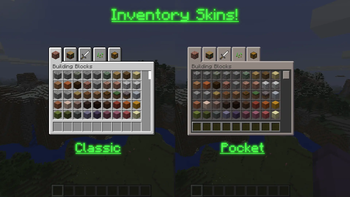
- The inventories have 2 UI choices: Pocket and Classic.
- The Pocket UI is a skin of the Java UI, to match Pocket Edition closely. Lots of attention to detail was put into the colors for the slots. This affects all inventories - Creative, Survival, and all blocks which have a GUI.
- The Classic UI is an imitation of the Windows 10 and Apple TV editions of the game. This only affects the Creative inventory, Beacon menu, and Stonecutter menu.
- Additionally, the Creative inventory has the old Minecraft PE tabs with the exact same order of items.
The Pocket UI is automatically enabled. You can change this in the resource pack settings.

You can invite players to your world again via the e4mc mod!
In the pause screen, just click Invite via e4mc, set up the world, and enjoy playing with friends!

- Infested stone blocks are marked with the border for the item model only (this isn't an MCPE feature but I added it for convenience).
- F3 Debug screen matches the screen from Minecraft Beta.
- The Grass Path and Farmland have been added to the Creative inventory.
- You can activate a coordinates HUD per-world via
/trigger ch_toggle

I hope you enjoy playing reViva as much as I enjoyed making it! If you want to see more of what I do, you should check out my YouTube! I made this modpack in my own time, so if you'd like to, I'd really appreciate it if you would check out my socials and perhaps share reViva with friends!
- Edition: Minecraft Java
- File type: .jar
- Minecraft version listed: 1.20.1
- How to install: Install the matching mod loader (Forge, Fabric or NeoForge) for your Minecraft version. → Download the .jar. → Put it in the .minecraft/mods folder and launch that loader profile.
- Where to get it: Opens on Modrinth — not every file is mirrored on our own servers.
Install steps are the general flow for this file type — How to install Minecraft Java mods & modpacks walks through it step by step.
- Downloads as reViva.mrpack
- Download size: 10.5 MB
- Download link checked 5 Sept 2026 — working
These come from our own check of the pack file, not from the source page.