
Vanilla Rewritten
A modpack that doesn't take away anything from Vanilla but adds more features for singleplayer, and also some for multiplayer.
⬇ Download on Modrinth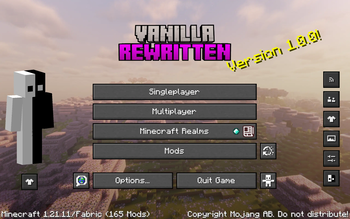
Vanilla Rewritten
Vanilla Rewritten is a Minecraft modpack that focuses on performance while keeping the classic gameplay intact. This pack combines several optimization tools, visual improvements, and utility features to help your world run smoothly.
Performance & Optimization
Enjoy a high frame rate with top optimization mods:
- Sodium & Sodium Extra: These mods offer significant FPS boosts and more graphical settings.
- Lithium: This mod optimizes game physics and logic to cut down on lag.
- FerriteCore: It greatly lowers memory usage.
- ImmediatelyFast & BadOptimizations: These mods speed up rendering and simplify background processes.
- EntityCulling & MoreCulling: This feature enhances performance by avoiding the rendering of hidden objects.
Visual Enhancements
Improve your world’s appearance while keeping the vanilla style:
- Iris Shaders: Supports modern shaders with high performance.
- Continuity: Enables connected textures for glass and other blocks.
- LambDynamicLights: Adds real-time lighting effects to held torches and glowing entities, in case you don't want shaders
- Entity Texture Features (ETF) & Entity Model Features (EMF): Allow for more varied and detailed mob appearances.
- Wavey Capes & Skin Layers: Add fluid physics to capes and create a 3D effect on player skins.
- Serene Seasons: Makes the game have seasons based on in-game days! It affects your crop growth, while also providing a guide on when they thrive for each season!
Utility & Navigation
Easily navigate your world and manage your resources:
- Xaero’s Minimap & World Map: These are high-performance mapping tools for tracking your exploration.
- Jade: Provides on-screen tooltips for blocks and entities you are looking at.
- AppleSkin: Shows food values and saturation details on the hunger bar.
- Mouse Tweaks & Smooth Scrolling: Improve inventory interactions and menu navigation.
- Zoomify: A flexible zoom feature for scouting terrain.
Quality of Life & Privacy
- Panorama Screenmake: Allows you to make your own panoramas at the press of a button.
- No Chat Reports: Turns off the chat reporting system to protect player privacy.
- Freecam: Lets you scout areas or look at your builds from a distance.
- Chat Heads: Displays player heads alongside their chat messages.
Versions Supported
- 1.21.11
- 1.21.10
Library Mods
- Almanac
- Cloth Config
- Fabric API
- Fabric Language Kotlin
- GlitchCore
- Konkrete
- Lithostitched
- Placeholder API
- Resourceful Lib
- Searchables
- YACL
v1.0.1 licensed MIT
- Edition: Minecraft Java
- File type: .jar
- Minecraft version listed: 1.21.10
- How to install: Install the matching mod loader (Forge, Fabric or NeoForge) for your Minecraft version. → Download the .jar. → Put it in the .minecraft/mods folder and launch that loader profile.
- Where to get it: Opens on Modrinth — not every file is mirrored on our own servers.
Install steps are the general flow for this file type — How to install Minecraft Java mods & modpacks walks through it step by step.
- Downloads as 1.21.10.mrpack
- Download size: 132.8 MB
- Download link checked 11 Sept 2026 — working
These come from our own check of the pack file, not from the source page.