
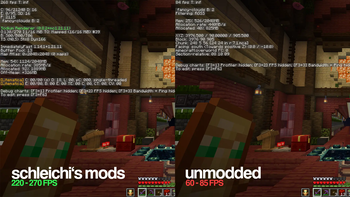

Update 10th July 2026
All modpacks have been removed because a critical security vulnerabilty potentially allowing remote code execution has been found for nearly all versions of Litematica. The only modpacks that are still listed, contain safe Litematica versions. See: Reddit Post
Schleichi's Mods
Sick of Minecraft running slow, looking plain, or feeling weird to play?
That's exactly why we made this modpack. This pack brings together good performance, building help, and quality-of-life mods ALL in one place, put together by multiple expert Technical Minecraft players to create the best all-in-one Modpack.
Features
📈 Performance - higher FPS, faster loading, and smoother gameplay even in large and complex worlds
🖼️ Visuals - lighting, shadows, connected textures, and improved rendering - while still respecting Minecraft’s vanilla aesthetics
🏗️ Building - blueprint systems, placement helpers, and large-scale editing tools similar to Paint allow you to construct complex and ginormous builds faster and better
⚙️ Technical Play - this pack includes the tools you need to test and push redstone contraptions to your maximum level
🌟 Quality Of Life - menus are cleaner, inventory handling is smarter
🤖 Control your game - spawn bots to load chunks or fulfill tasks - for technical players who love control.
About some Mods
Some mods in this modpack are pretty complex and learny. If you want to truly experience the more "technical" side of this modpack, feel free to take a look at these hand-picked YouTube videos about these mods:
Axiom - Become a master at building: (1h 51m)
Carpet - Control your world with bots: (54m)
Litematica - Build your favourite farms with blueprints: (9m)
Item Scroller - Craft and move around items like a king: (10m)
Tweakeroo - The most versatile quality-of-life mod of all time: (17m)
Client Commands - Useful commands to speed up your gaming process
Github (by earthcomputer)
Mods put together by Schleichi
- Edition: Minecraft Java
- File type: .jar
- Minecraft version listed: 1.21.11
- How to install: Install the matching mod loader (Forge, Fabric or NeoForge) for your Minecraft version. → Download the .jar. → Put it in the .minecraft/mods folder and launch that loader profile.
- Where to get it: Opens on Modrinth — not every file is mirrored on our own servers.
Install steps are the general flow for this file type — How to install Minecraft Java mods & modpacks walks through it step by step.
- Downloads as 1.21.11 v2.2.mrpack
- Download size: 19.1 MB
- Download link checked 6 Sept 2026 — working
These come from our own check of the pack file, not from the source page.