
Smooth Journey Forge(Lite Version)
This modpack tries to optimize Minecraft by using some optimized mods,while adding some utility mods.
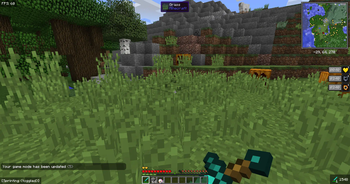
In version 1.8.9, you can use features that enhance the PVP experience, such as CPS display and status effect display, as well as features that improve the multiplayer experience, such as chat translation. There are also mods that improve the vanilla game experience, such as Xaero's Minimap and What Am I Looking At.
No mods that change the gameplay have been added,so it can be joined to any vanilla server.
It's enjoyable for me to make a modpack.I hope you enjoy it.
Mods from CurseForge:
Waila
BehindYouV3
Chatting
ColorSaturation
Controlling
CrashPatch
CustomSkinLoader
DamageTint
Ding
EasyLAN
EntityCulling
EvergreenHUD
FPS Reducer
Freelook
Fullscreen Windowed
GlintColorizer
I18nUpdateMod
InputMethodBlocker
Inventory HUD+
ItemPhysic
Just Enough Items
Just Enough Resources
Keystrokes
Mini HUD
MoreOverlays
No Chat Hide
OneConfig-Bootstrap
OverflowAnimations
OverflowParticles
Patcher
PolyBlur
PolyCrosshair
PolyHitbox
PolyNametag
PolySprint
PolyTime
PolyWeather
REDACTION
RawInput
Real-time translation mod
Redirectionor [Retro]
Replay Mod
Resourcify
ToroHealth Damage Indicators
Unicode Fix
VanillaHUD
ViaForge
Waila
WaveyCapes
WorldEdit
WorldEdit CUI Forge Edition
Xaero's Minimap
Xaero's World Map
- Edition: Minecraft Java
- File type: .jar
- Minecraft version listed: 1.8.9
- How to install: Install the matching mod loader (Forge, Fabric or NeoForge) for your Minecraft version. → Download the .jar. → Put it in the .minecraft/mods folder and launch that loader profile.
- Where to get it: Opens on Modrinth — not every file is mirrored on our own servers.
Install steps are the general flow for this file type — How to install Minecraft Java mods & modpacks walks through it step by step.
- Downloads as Smooth Journey 0.1 for Minecraft 1.8.9.mrpack
- Download size: 2.3 MB
- Download link checked 20 Aug 2026 — working
These come from our own check of the pack file, not from the source page.