
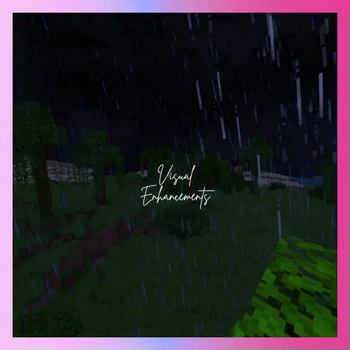
Visual Enhancements Mod Description
The Visual Enhancements mod is designed to elevate your Minecraft experience by improving the game's aesthetics without altering gameplay mechanics. It focuses solely on enhancing how the game looks—adding subtle effects like smoother animations, refined particles, and atmospheric overlays that enrich the visual atmosphere without impacting performance or game balance.
Built with simplicity and compatibility in mind, this mod ensures that your gameplay remains untouched while providing a fresh, immersive visual experience. Whether you're creating cinematic content, exploring your world, or just enjoying everyday play, Visual Enhancements adds polish and detail that make Minecraft feel more vibrant and alive.
Because it doesn't affect gameplay, it pairs perfectly with optimization-focused modpacks or any other mods you prefer. Updates are streamlined to keep visuals crisp and up-to-date with the latest Minecraft versions, so you can enjoy beautiful graphics without compromise.
If you encounter any issues or want to share feedback, support is available through the community Discord—everyone’s input is welcome to help improve the mod further!
Enjoy a visually richer Minecraft world, without changing how you play.







- (Bee's) fancy Crops by bebebea_loste
- [EMF] Entity Model Features by Traben
- [ETF] Entity Texture Features by Traben
- 3D Skin Layers by tr7zw
- AppleSkin By squeek502
- Camera Utils By henkelmax
- CIT Reswen by shsupercm
- Cloth Config API by shedaniel
- Colorful Containers GUI by Kingybu
- Continuity by PepperCode1
- Cool Rain by Jaiz
- Detail Armour Bar by RedLime
- Dramatic Skys by thebaum64
- Eating Animation by theoness1
- Elytra Contrails by dbrighthd
- Enchant Icons by CountXD
- Even better Enchants by mythitorium
- Explosive Enhancement by Superkat32
- Fabric API by modmuss50
- Forge Config API Port by Fuzs
- Fresh Animations by FreshLX
- Fresh Animations - Extentions by FreshLX
- Fresh Moves by TrasTick
- GeckoLib by Gecko
- Iris Shaders by coderbot
- Jade 🔍 by Snownee
- LambDynamicLights by LambdAurora
- Low On Fire by Haikis
- Main Menu Panoramas by sumone_lol
- Make Bubbles Pop by Tschipcraft
- Motschen's Better Leaves by Motschen
- Not Enough Animations by tr7zw
- Nuit (formerly FabricSkyBoxes) by FlashyReese
- Optiboxes by Legacy Visuals Project
- oωo(owo-lib) by Wisp Forest
- Particle Rain By PigCart
- Particular ✨ by Chai
- Puzzles Lib by Fuzs
- Simple Grass Flowers by 2DWisp
- Sodium by CaffineMC
- Sound Physics Remastered by henkelmax
- Translations for Sodium by robotkoer
- Visuality by PinkGoosik
- Wakes by Goby56
- YetAnotherConfigLib (YACL) by isxander
- Edition: Minecraft Java
- File type: .jar
- Minecraft version listed: 1.21.1
- How to install: Install the matching mod loader (Forge, Fabric or NeoForge) for your Minecraft version. → Download the .jar. → Put it in the .minecraft/mods folder and launch that loader profile.
- Where to get it: Opens on Modrinth — not every file is mirrored on our own servers.
Install steps are the general flow for this file type — How to install Minecraft Java mods & modpacks walks through it step by step.
- Downloads as Vanilla Improved 1.0.0.mrpack
- Download size: 36 KB
- Download link checked 10 Sept 2026 — working
These come from our own check of the pack file, not from the source page.