
this modpack aims to make minecraft run as fast as possible on low end/old systems. It should only be used on older pcs.
it's recommended to choose the 1.16.5 version, as it runs better and has more mods.
mods included (1.16.5)- Better Beds [1.1.0] by Motschen, TeamMidnightDust
- Dynamic FPS [3.9.4] by juliand665, LostLuma
- Enhanced Block Entities [0.4] by FoundationGames
- EntityCulling-Fabric [1.5.2] by tr7zw
- FPS Reducer [1.24-mc1.16.5] by bre2el
- Fabric API [0.42.0+1.16] by FabricMC
- FerriteCore [2.1.1] by malte0811
- Krypton [0.1.2] by tuxed
- LazyDFU [0.1.2] by tuxed
- Let Me Despawn [1.3.2c] by frikinjay
- Lithium [0.6.6] by JellySquid
- Memory Leak Fix [1.1.5] by FX - PR0CESS
- ModernFix [5.18.0+mc1.16.5] by embeddedt
- Phosphor [0.8.0] by JellySquid, PhiPro
- Sodium [0.2.0+build.4] by JellySquid
- retiNO [1.0.1] by juliand665
- Almanac [1.4.4] by frikinjay
- Better Beds [1.4.1] by Motschen, TeamMidnightDust
- Dynamic FPS [3.9.4] by juliand665, LostLuma
- Enhanced Block Entities [0.11.3+1.21.4] by FoundationGames
- EntityCulling [1.7.4] by tr7zw
- FPS Reducer [1.21.3-2.11] by bre2el
- Fabric API [0.119.2+1.21.4] by FabricMC
- FerriteCore [7.1.1] by malte0811
- Krypton [0.2.8] by tuxed
- Let Me Despawn [1.5.0] by frikinjay
- Lithium [0.15.3+mc1.21.4] by JellySquid, 2No2Name
- ModernFix [5.20.3+mc1.21.4] by embeddedt
- Sodium [0.6.13+mc1.21.4] by JellySquid (jellysquid3)
- Almanac [1.4.5] by frikinjay
- Dynamic FPS [3.9.4] by juliand665, LostLuma
- EntityCulling [1.7.4] by tr7zw
- FPS Reducer [1.21.5-2.12] by bre2el
- Fabric API [0.124.2+1.21.5] by FabricMC
- FerriteCore [8.0.0] by malte0811
- Krypton [0.2.9] by tuxed
- Let Me Despawn [1.5.1] by frikinjay
- Lithium [0.16.2+mc1.21.5] by JellySquid, 2No2Name
- Sodium [0.6.13+mc1.21.5] by JellySquid (jellysquid3)
how do I install?
to install this modpack (or any modpack on modrinth), you'll need
- a launcher which can install .mrpack files (most modern launchers)
- that's basically it
here is the full image tutorial (for prism launcher/multimc)
guide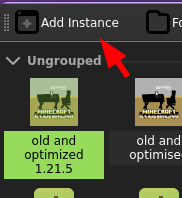
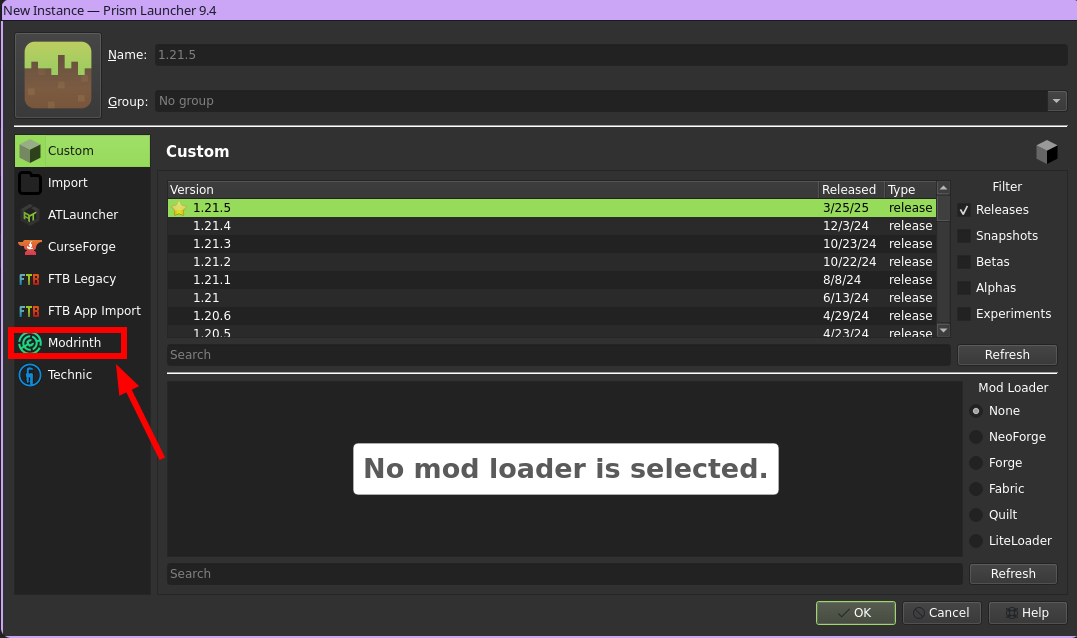 and then search for the modpack, and click download!
Quick facts
- Edition: Minecraft Java
- File type: .jar
- Minecraft version listed: 1.21.5
- How to install: Install the matching mod loader (Forge, Fabric or NeoForge) for your Minecraft version. → Download the .jar. → Put it in the .minecraft/mods folder and launch that loader profile.
- Where to get it: Opens on Modrinth — not every file is mirrored on our own servers.
Install steps are the general flow for this file type — How to install Minecraft Java mods & modpacks walks through it step by step.
Verified by MCModsHub
- Downloads as old and optimized 1.21.5.mrpack
- Download size: 2 KB
- Download link checked 6 Sept 2026 — working
These come from our own check of the pack file, not from the source page.