
Catppuccin UI
I don't know my version or loader
About
Catppuccin UI is a Minecraft resource pack that is based on the Catppuccin colour theme and focuses on theming Minecraft GUI. Catppuccin theme consists of 4 beautiful pastel colour palettes, named flavors. Read more about Catppuccin here.
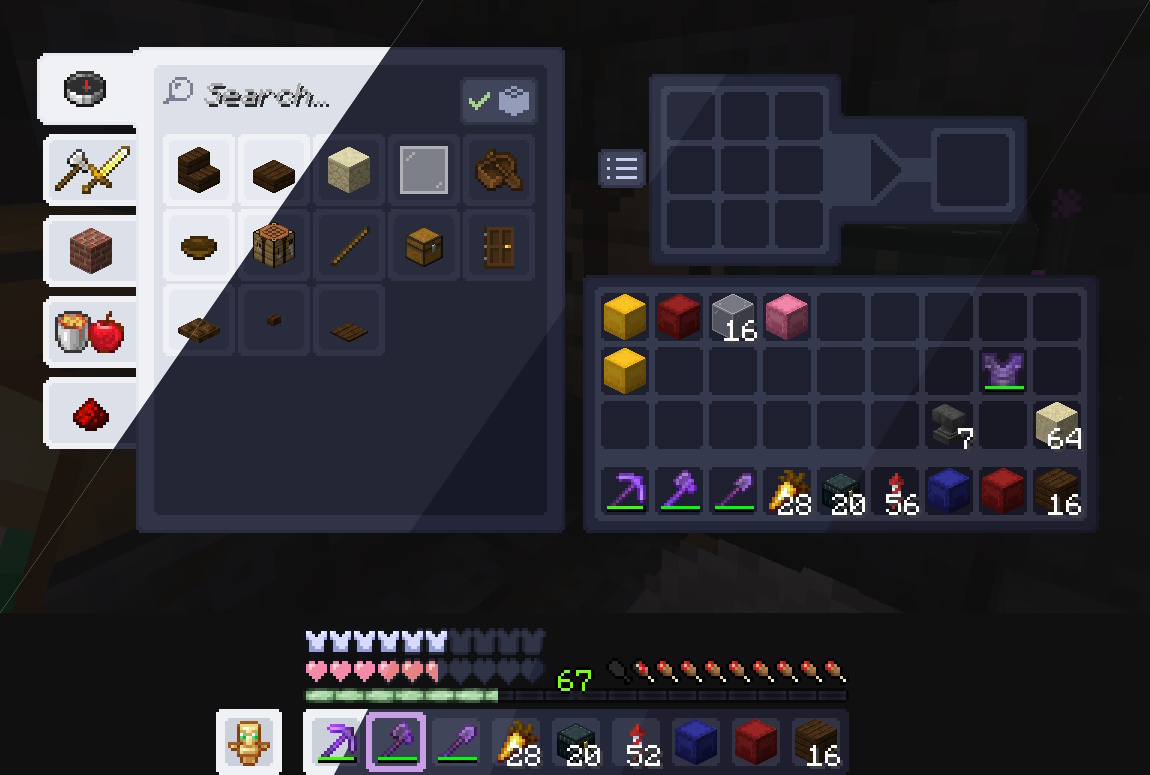
Why to use Catppuccin UI?
Catppuccin theme consists of 4 different flavors and each flavor has 14 accent colors to choose from. Don't know which flavor and accent color to use? See all four colour palettes
All Minecraft versions from 1.6.1 to 1.21.10 are supported. Also, many mods are supported, see the full list in section Supported mods.
It's not just a resource pack. Catppuccin theme is available for many programs and sites. There's one even for Modrinth. See All Catppuccin ports and Catppuccin for Modrinth.
Usage
- Go to versions page and click on the version with your preferred flavor and the Minecraft version you're playing.
- Scroll down to the "Files" section and download
Catppuccin {flavor} {accent color}.zipzip file with your preferred accent color. - Move that zip file you downloaded to the
resourcepacksfolder within your.minecraftdirectory (or your Minecraft profile folder, depending on your installation). - Launch Minecraft and open the resource packs menu from the options.
- Select the pack and press done.
Updating is recommended to be done manually following steps above. Some launchers allow updating resourcepacks automatically, it is not recommended for this resourcepack. Launchers can't detect correct version due to the way different versions of all flavors/accent colors are managed.
Supported mods
Adding support for new mods in Catppuccin UI is temporarily paused. I plan to add support for more mods in future, so feel free to make mod support requests.
Feel free to create an issue on our GitHub issues page if you encounter a mod that isn't supported yet or have any suggestions.
List of supported mods. Click to expand.Last update to this list was made on December 5, 2024.
[ALL] = All Minecraft versions that the mod & this resource pack supports.
| Mod name (A-Z) | Minecraft versions | Known issues/additional info | Added in |
|---|---|---|---|
| AdvancementInfo | [ALL] | Info panel background color is wrong. | v1.1.0 |
| Alloy Forgery | [ALL] | v1.3.0 | |
| AppleCore | [ALL] | v1.1.0 | |
| AppleSkin | [ALL] | v1.1.0 | |
| Auth Me | [ALL] | v1.0.0 | |
| Axiom | [ALL] | Wrong text color used in many places. Can't really do anything about it. | v1.3.0 |
| BedrockIfy | [ALL] | v1.1.0 | |
| Better Advancements | [ALL] | v1.1.0 | |
| Better Furnaces Reforged | [ALL] | Sliders in the color upgrade screen are slightly broken. Some textures can't be changed due to being hardcoded. Also, some inventories might have wrong text color that can't be changed. | v1.3.0 |
| Capes | [ALL] | v1.0.0 | |
| Chat Patches | [ALL] | v1.0.0 | |
| Cherished Worlds | [ALL] | v1.1.0 | |
| Cloth Config API | [ALL] | v1.0.0 | |
| Condensed Creative | [ALL] | v1.1.0 | |
| CreativeButtonMover | 1.15.X | v1.2.0 | |
| Ellemes' Container Library | [ALL] | v1.2.0 | |
| EMI | [ALL] | Grinding and brewing recipe textures are bit broken. | v1.0.0 |
| EMI Loot | [ALL] | In the gameplay drops tab "Minecraft Gameplay Drops" text color is wrong. | v1.0.0 |
| EMIffect | [ALL] | v1.0.0 | |
| Emi Trades | [ALL] | v1.0.0 | |
| Expanded Storage | [ALL] | When using the paginated screen type, the page number text color is wrong and the last page might have weird lines. Also, when enabling/disabling the pack while in world/server, you might have to relog to see container name colors update. | v1.2.0 |
| Fabric item group API | [ALL] | v1.0.0 | |
| FZMM | [ALL] | v1.0.0 | |
| Inventory Sorting | [ALL] | v1.1.0 | |
| Inventory Profiles Next | [ALL] | v1.1.0 | |
| In-Game Account Switcher | [ALL] | v1.0.0 | |
| Iris Shaders | 1.18.2 - latest (except 1.19.3) | Works only with Iris 1.6 and newer. | v1.0.0 |
| jGui | [ALL] | Many elements can't be themed due to being hardcoded. | v1.1.0 |
| LambdaControls | [ALL] | v1.1.0 | |
| Language Reload | [ALL] | v1.0.0 | |
| Let's Do: API | [ALL] | v1.3.0 | |
| Let's Do: Bakery | [ALL] | v1.3.0 | |
| LibGui | [ALL] | Item slot borders are thinner. | v1.1.0 |
| libIPN | [ALL] | v1.1.0 | |
| MaLiLib | [ALL] | v1.1.0 | |
| MidnightControls | [ALL] | v1.1.0 | |
| MidnightLib | [ALL] | v1.1.0 | |
| Mod Menu | [ALL] | v1.0.0 | |
| No AI Spawn Eggs | [ALL] | v1.1.0 | |
| No Chat Reports | [ALL] | v1.0.0 | |
| Organizable Play Screens | [ALL] | v1.0.0 | |
| oωo (owo-lib) | [ALL] | v1.1.0 | |
| Panorama Screens | [ALL] | v1.3.0 | |
| Piercing Paxels | [ALL] | v1.3.0 | |
| Plasmo Voice | [ALL] | v1.1.0 | |
| Puzzle | [ALL] | v1.1.0 | |
| Quilt Item Groups API | [ALL] | v1.1.0 | |
| Raised | [ALL] | v1.3.0 | |
| ReplayMod | [ALL] | Many elements can't be themed due to being hardcoded. | v1.1.0 |
| Screenshot Viewer | [ALL] | v1.2.0 | |
| Show Me Your Skin | [ALL] | Player name text color is wrong in the local overrides config. | v1.0.0 |
| Shulker Box Tooltip | [ALL] | v1.1.0 | |
| Simple Voice Chat | [ALL] | Group name in group screen has wrong text color. | v1.1.0 |
| SpruceUI | [ALL] | v1.1.0 | |
| Supplementaries | [ALL] | v1.3.0 | |
| TCDCommons API | [ALL] | v1.0.0 | |
| Tech Reborn | [ALL] | Slot borders are thinner. Also, some textures and text colors can't be changed due to being hardcoded. | v1.3.0 |
| Things | [ALL] | v1.1.0 | |
| TooltipTexture | [ALL] | Added to vanilla, mod not required after Minecraft 1.21.2! | v1.2.0 |
| Trinkets | [ALL] | Glove slot borders are thinner and corners are not round. | v1.1.0 |
| ViaFabric | [ALL] | v1.0.0 | |
| Visible Barriers | [ALL] | v1.0.0 | |
Credits
Dracula Theme and its maintainer(s) as this pack is based on it
Contributors of catppuccin/minecraft GitHub repository
- Edition: Minecraft Java
- File type: .zip (resource pack)
- Minecraft versions listed: 1.20.2, 1.20.3, 1.20.4
- How to install: Download the .zip resource pack — do not unzip it. → Put it in .minecraft/resourcepacks. → Enable it in Options → Resource Packs.
- Where to get it: Opens on Modrinth — not every file is mirrored on our own servers.
Install steps are the general flow for this file type — How to install Minecraft Java resource packs walks through it step by step.
- Downloads as Catppuccin Mocha Blue.zip
- Download size: 1.2 MB
- Download link checked 27 Aug 2026 — working
These come from our own check of the pack file, not from the source page.