HomeJavaResourcepacksGlowing Trim Weapon & Tools
Glowing Trim Weapon & Tools
ResourcepacksJava

Glowing Trim Weapon & Tools

by STM19 · on Modrinth

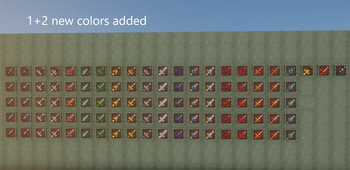
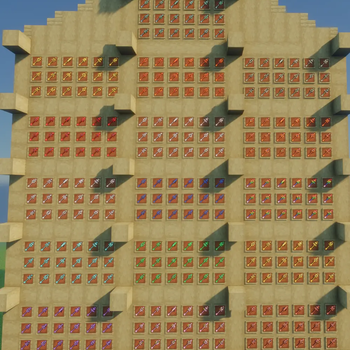
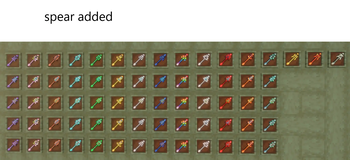
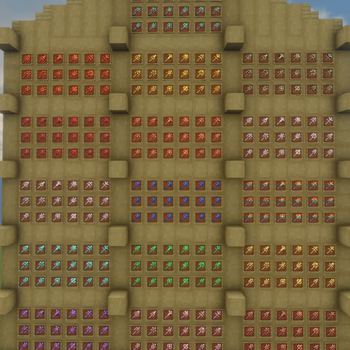
Now weapon and tools has 18 trims and 13+3 colors . Sword ,trident, spear, mace and tools just rename it Optifine required version from 1.16 to latest

⬇ Download on Modrinth
Glowing Trim Weapon & Tools — screenshot 1Glowing Trim Weapon & Tools — screenshot 2Glowing Trim Weapon & Tools — screenshot 3Glowing Trim Weapon & Tools — screenshot 4Glowing Trim Weapon & Tools — screenshot 5Glowing Trim Weapon & Tools — screenshot 6Glowing Trim Weapon & Tools — screenshot 7Glowing Trim Weapon & Tools — screenshot 8

✨ Glowing Trim Weapon & Tools Pack

Hello everyone! 👋 Back again with a brand new pack for Minecraft!

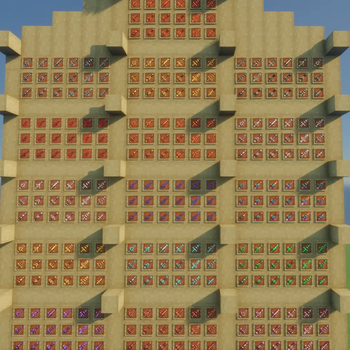
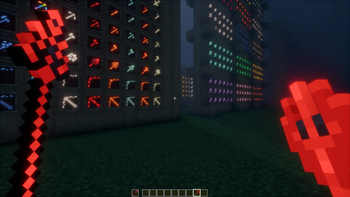
Introducing the Glowing Trim Weapon & Tools Pack — a stylish texture pack that adds glowing trim designs to your weapons and tools, giving them a unique, vibrant look.

Whether you play with shaders or not, this pack works smoothly and enhances your gameplay with eye-catching visuals.


🔥 Features ✨ Glowing (Emissive) Trim Effects 🎨 13 Base Colors + 3 Netherite-Exclusive Colors 🛡️ 18 Unique Trim Designs ⚔️ Supports Weapons & Tools 🔧 Easy activation via item renaming 💡 Works with or without shaders


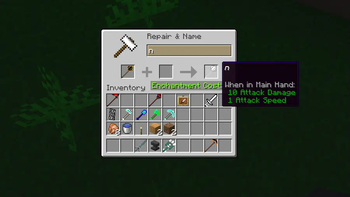
📌 Important Information ✔ OptiFine is required ✔ Uses Custom Item Textures (CIT) via renaming ✔ Effects apply only to weapons & tools ✔ Simply rename items to activate designs


⚔️ Supported Items

Weapons:

Mace, Trident, Spear Bow, Crossbow Sword (Iron, Copper, Gold, Diamond, Netherite)

Tools:

Hoe, Shovel, Pickaxe, Axe (Iron → Netherite)


🎨 Color System 🌈 Base Colors (13)

Color Name Code
Amethyst a
Copper c
Cherry ch
Diamond d
Emerald e
Gold g
Iron i
Lapis l
Netherite n
Quartz q
Redstone r
Resin rs
Prismarine p

🔥 Netherite Exclusive (+3)

| Gilded Blackstone | gb | | Magma | m | | Sculk | s |


🛡️Trim Designs

Design Code
Bolt 1
Coast 2
Dune 3
Eye 4
Flow 5
Host 6
Raiser 7
Rib 8
Sentry 9
Shaper 10
Silence 11
Snout 12
Spire 13
Tide 14
Vex 15
Ward 16
Wayfinder 17
Wild 18

⚙️ How to Use

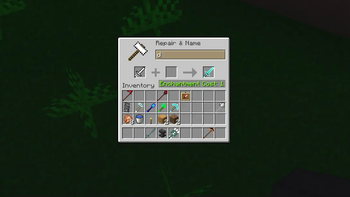
Rename your item using: [Color Code] + [Design Code]

Examples: r14 , a10 , l6 , g7 , c4 , d16 , l2 , n9 , i3 , q12, ch18 , rs17, p15.

🔥 Netherite Only Examples: m5, gb6, s10


📌 Fixed Design Items

(Trident, Bow, Crossbow, Tools) Use color code only: Examples: r , a , l , g , c , d , l , n , i , q , ch , rs, p.

🔥 Netherite Only Examples: m , gb , s


✨ Changes Applied

-After applying the pack:

1]Spear models (1.21.11+) 2]Mace models (1.21+) 2]Trident, Bow, Crossbow 3]All Swords (Iron → Netherite) 4]All Tools (Iron → Netherite) 5]🆕 Copper weapons (1.21.9+) 6]GUI elements


⚠️ OptiFine Settings Required

Make sure these options are enabled: ✔ Emissive Textures ✔ Custom Items

Otherwise, the pack may not work properly. Without OptiFine, the glowing (emissive) effect may not work, or the entire pack may fail.


===🔧 Alternative Mods===

=Fabric Mods ---EMF (Entity Model Features) ---ETF (Entity Texture Features) ---Continuity ---CIT Resewn/CIT Resewn Continuation ---Indium

=Forge Mods ---EMF (Entity Model Features) ---ETF (Entity Texture Features) ---Connectedness ---Fusion (Connected Textures) ---CIT Resewn/CIT Resewn Continuation

=NeoForge Mods ---EMF (Entity Model Features) ---ETF (Entity Texture Features) ---Continuity ---CIT Resewn/CIT Resewn Continuation


❗ Troubleshooting

🔄 Reload resource packs if it stops working ⚙️ Check OptiFine version compatibility 📦 Ensure proper installation


🌍 Compatibility ✔ Singleplayer & Multiplayer ✔ Versions: 1.16 → Latest ✔ Separate files per version


🎉 Final Note

Upgrade your gear with glowing trims and stand out in your world.

Thanks for downloading ❤️.

Quick facts

Install steps are the general flow for this file type — How to install Minecraft Java resource packs walks through it step by step.

Verified by MCModsHub

These come from our own check of the pack file, not from the source page.

Explore more