GUI Overhaul
I don't know my version or loader


Version 26.1 of the resource pack is here!
📢 Latest version: 26.1

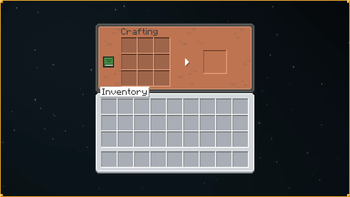
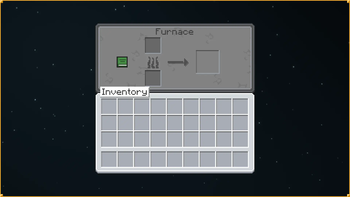
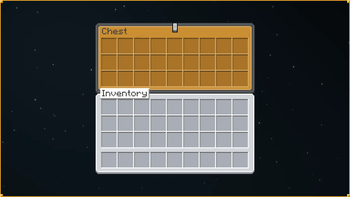
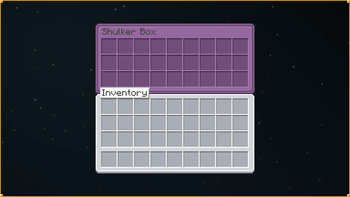
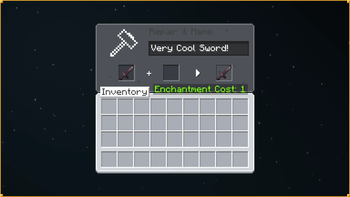
Welcome to GUI Overhaul! This is a resource pack that overhauls the colors and appearance of all buttons and inventory screens, making Java Edition's GUIs more in parity with Bedrock Edition while keeping the the classic default style.
This pack comes with 2 color modes: Default and Dark, supports custom inventory screens likes barrel, ender chest and shulker boxes by using OptiGUI (most recommended) or Optifine.

🔧 Currently supported versions: 1.20.2 → 26.2.
🛠️ Currently supported mods: 13.
- AppleSkin
- Axiom
- Cherished Worlds
- Cloth Config API
- Distant Horizons
- Fabric Mod Loader
- Icons
- Iris Shaders
- Jade
- Just Enough Items
- Mod Menu
- No Chat Reports
- Optifine
- OptiGUI
- ReplayMod
- Shulker Box Tooltip [*NEW]
- Sodium
- Traveler's Backpack (latest)
- Voice Chat
Q&A section:
How can I download this resource pack? Follow these steps to download and install this resource pack correctly:1️⃣ Download the resource pack
- Go to Version.
- Select the version that matches the Minecraft version you are currently using.
- Check the version number and the name below it to choose:
- The latest compatible version
- Your preferred variant (Default / Dark mode)
- Click Download.
What you should get is a .zip file. Do not extract it.
2️⃣ Install the Resource Pack
Locate the downloaded .zip file and move it into your resourcepacks folder using one of the methods below:
From Minecraft (Recommended)
- Open Minecraft.
- Go to Options → Resource Packs → Open Pack Folder.
Windows
- Press
Ctrl + Rto open Run.- Go to
%appdata%/Roaming/.minecraft/resourcepack.
macOS
- Open Finder, press
Cmd + Shift + G.- Go to
~/Library/Application Support/minecraft/resourcepacks.
Linux
- Open your file manager.
- Go to
~/.minecraft/resourcepacks.
Once the resourcepacks folder opens, drag and drop the downloaded .zip file into it.
3️⃣ Select the resource pack
Once you're done the resource pack should appears in the Available section, select the resource pack and apply!
Made with 🩵 by itsquasi.
- Edition: Minecraft Java
- File type: .zip (resource pack)
- Minecraft versions listed: 1.21.6, 1.21.7, 1.21.8
- How to install: Download the .zip resource pack — do not unzip it. → Put it in .minecraft/resourcepacks. → Enable it in Options → Resource Packs.
- Where to get it: Opens on Modrinth — not every file is mirrored on our own servers.
Install steps are the general flow for this file type — How to install Minecraft Java resource packs walks through it step by step.
- Downloads as GUI Overhaul 26.1.zip
- Download size: 563 KB
- Download link checked 27 Aug 2026 — working
These come from our own check of the pack file, not from the source page.