HomeJavaResourcepacks🎨 Custom Outline
🎨 Custom Outline
ResourcepacksJava

🎨 Custom Outline

by NotToBlame · on Modrinth

Which Minecraft do you have?

Every version of the game needs its own build. Pick yours, then download — the wrong build installs fine and then does nothing in the game. This mod is built for Resource pack only.

⬇ Download for 1.21.11–26.2⬇ Download for 1.21.9–1.21.10⬇ Download for 1.21.6–1.21.8⬇ Download for 1.21.2–1.21.5⬇ Download for 1.17–1.21.1
I don't know my version or loader
Open the Minecraft launcher and look at the profile you play on — it names both, like fabric-loader-1.21.4. The version also shows in the bottom-right corner of the game's main menu.
No loader in the profile name? Then it's plain Minecraft, and these mods won't run — you need Fabric or NeoForge installed first.
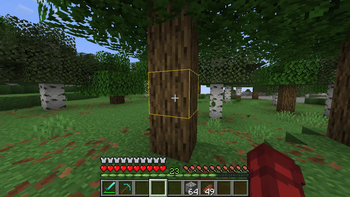
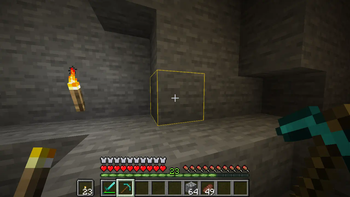
🎨 Custom Outline — screenshot 1🎨 Custom Outline — screenshot 2

Custom Outline Banner

GitHub Ko-Fi Twitch Support Discord

This pack allows you to fully customize the block outline color in Minecraft, giving your game a personalized visual style.
By default, it comes with the color #ffcc0080 Default Color Swatch

Customize Outline

There are two ways to set your own outline color:

1. Manual Method:

Edit the rendertype_lines.vsh file directly at:
assets/minecraft/shaders/core/rendertype_lines.vsh

Modify the line:
temp = vec4(1.0, 0.8, 0.0, 0.5); // RGBA
Replace with your desired RGBA values.

2. Web Generator:

Use the custom generator to create a pack in your desired color. Choose from sliders, HEX input, presets, or save your own.

Open the Custom Outline Generator

Web Generator Preview

⚠️ Compatibility

Not compatible with shaderpacks (e.g. Iris, Optifine) as they override core shaders.

If you would like to use shaders with a custom outline. You will need to use shaders that have their own custom outline option such as:
Complementary Reimagined
Complementary Unbound
or Photon Shader

Need help or have a suggestion?
Reach out on GitHub or join the Discord.

License

🎨 Custom Outline is © NotToBlame. You are permitted to:

You may not:

Read the full license →

Quick facts

Install steps are the general flow for this file type — How to install Minecraft Java resource packs walks through it step by step.

Verified by MCModsHub

These come from our own check of the pack file, not from the source page.

Explore more